<?xml version="1.0" encoding="utf-8"?><feed xmlns="http://www.w3.org/2005/Atom" ><generator uri="https://jekyllrb.com/" version="3.10.0">Jekyll</generator><link href="https://wario84.github.io/idsc_mgs/feed.xml" rel="self" type="application/atom+xml" /><link href="https://wario84.github.io/idsc_mgs/" rel="alternate" type="text/html" /><updated>2026-03-13T09:32:11+00:00</updated><id>https://wario84.github.io/idsc_mgs/feed.xml</id><title type="html">Introduction to Applied Data Science</title><subtitle>This website covers the material for the course Applied Data Science.</subtitle><entry><title type="html">Lecture 8: Roll of Data Science in Society.</title><link href="https://wario84.github.io/idsc_mgs/2022/03/29/w8_2_Lecture_08.html" rel="alternate" type="text/html" title="Lecture 8: Roll of Data Science in Society." /><published>2022-03-29T00:00:00+00:00</published><updated>2022-03-29T00:00:00+00:00</updated><id>https://wario84.github.io/idsc_mgs/2022/03/29/w8_2_Lecture_08</id><content type="html" xml:base="https://wario84.github.io/idsc_mgs/2022/03/29/w8_2_Lecture_08.html"><![CDATA[<h1 id="introduction">Introduction</h1>

<p>You’ll find this post in your <code class="language-plaintext highlighter-rouge">_posts</code> directory. Go ahead and edit it and re-build the site to see your changes. You can rebuild the site in many different ways, but the most common way is to run <code class="language-plaintext highlighter-rouge">jekyll serve</code>, which launches a web server and auto-regenerates your site when a file is updated.</p>

<p>Jekyll requires blog post files to be named according to the following format:</p>

<p><code class="language-plaintext highlighter-rouge">YEAR-MONTH-DAY-title.MARKUP</code></p>

<p>Where <code class="language-plaintext highlighter-rouge">YEAR</code> is a four-digit number, <code class="language-plaintext highlighter-rouge">MONTH</code> and <code class="language-plaintext highlighter-rouge">DAY</code> are both two-digit numbers, and <code class="language-plaintext highlighter-rouge">MARKUP</code> is the file extension representing the format used in the file. After that, include the necessary front matter. Take a look at the source for this post to get an idea about how it works.</p>

<p>Jekyll also offers powerful support for code snippets:</p>

<figure class="highlight"><pre><code class="language-ruby" data-lang="ruby"><span class="k">def</span> <span class="nf">print_hi</span><span class="p">(</span><span class="nb">name</span><span class="p">)</span>
  <span class="nb">puts</span> <span class="s2">"Hi, </span><span class="si">#{</span><span class="nb">name</span><span class="si">}</span><span class="s2">"</span>
<span class="k">end</span>
<span class="n">print_hi</span><span class="p">(</span><span class="s1">'Tom'</span><span class="p">)</span>
<span class="c1">#=&gt; prints 'Hi, Tom' to STDOUT.</span></code></pre></figure>

<p>Check out the <a href="https://jekyllrb.com/docs/home">Jekyll docs</a> for more info on how to get the most out of Jekyll. File all bugs/feature requests at <a href="https://github.com/jekyll/jekyll">Jekyll’s GitHub repo</a>. If you have questions, you can ask them on <a href="https://talk.jekyllrb.com/">Jekyll Talk</a>.</p>]]></content><author><name>Mario H. Gonzalez-Sauri</name></author><summary type="html"><![CDATA[Introduction]]></summary></entry><entry><title type="html">Tutorial 7: Introduction to String Analysis.</title><link href="https://wario84.github.io/idsc_mgs/2022/03/28/w7_1_Tutorial_07.html" rel="alternate" type="text/html" title="Tutorial 7: Introduction to String Analysis." /><published>2022-03-28T00:00:00+00:00</published><updated>2022-03-28T00:00:00+00:00</updated><id>https://wario84.github.io/idsc_mgs/2022/03/28/w7_1_Tutorial_07</id><content type="html" xml:base="https://wario84.github.io/idsc_mgs/2022/03/28/w7_1_Tutorial_07.html"><![CDATA[<h1 id="exercise-1-grepgrepl">Exercise 1: <code class="language-plaintext highlighter-rouge">grep()/grepl()</code></h1>

<p>a 1.1 Extract only the strings that contain an email address from the
following character vector
<code class="language-plaintext highlighter-rouge">a &lt;- c("www.google.com", "www.yahoo.com", "fisher@gmail.com", "www.youtube.com", "thompson@hotmail.com")</code>.</p>

<div class="language-plaintext highlighter-rouge"><div class="highlight"><pre class="highlight"><code>[1] "fisher@gmail.com"     "thompson@hotmail.com"
</code></pre></div></div>

<p>b 1.2 Display <code class="language-plaintext highlighter-rouge">TRUE</code> if the last name of the person starts with <strong>A</strong> or
<strong>G</strong> and <code class="language-plaintext highlighter-rouge">FALSE</code> otherwise using the following character vector
<code class="language-plaintext highlighter-rouge">b &lt;- c("Anderson", "Abel", "Armstrong", "Barbosa", "Brunton", "Boucher", "Crossley", "Cameron", "Cleveland", "Delatorre", "Durrant", "Ellwood", "Eaton", "Gibbins", "Griff", "Guzman")</code></p>

<div class="language-plaintext highlighter-rouge"><div class="highlight"><pre class="highlight"><code> [1]  TRUE  TRUE  TRUE FALSE FALSE FALSE FALSE FALSE FALSE FALSE FALSE FALSE
[13] FALSE  TRUE  TRUE  TRUE
</code></pre></div></div>

<h1 id="exercise-2-subgsub">Exercise 2: <code class="language-plaintext highlighter-rouge">sub()/gsub()</code></h1>

<p>a 2.1 Clean the following strings and transform this character vector
<code class="language-plaintext highlighter-rouge">c &lt;- c("cSVgKl9yyb", "e7w4o11oh8", "iYdWYvV7b2", "Epal3cNuGH", "NNhbMR0ocT", "fYaRvoag8B", "LO4fkHm7Kn", "JK8jKhS5De", "DcMAZ7Rxtp", "sV0tqC8XSd")</code>
into an integer type of vector.</p>

<div class="language-plaintext highlighter-rouge"><div class="highlight"><pre class="highlight"><code> [1]     9 74118    72     3     0     8    47    85     7     8
</code></pre></div></div>

<ol>
  <li>2.2 Clean the following strings by removing the quotes the following
character vector
<code class="language-plaintext highlighter-rouge">d &lt;-  c("\"abilene\"" , "\"christian\"", "\"university\"", "\"adelphi\"", "\"university\"", "\"adrian\"", "\"college\"", "\"agnes\"", "\"scott\"", "\"college\"", "\"alaska\"", "\"pacific\"", "\"university\"")</code></li>
</ol>

<!-- -->

<div class="language-plaintext highlighter-rouge"><div class="highlight"><pre class="highlight"><code> [1] "abilene"    "christian"  "university" "adelphi"    "university"
 [6] "adrian"     "college"    "agnes"      "scott"      "college"   
[11] "alaska"     "pacific"    "university"
</code></pre></div></div>

<h1 id="exercise-3-strsplit">Exercise 3: <code class="language-plaintext highlighter-rouge">strsplit</code></h1>

<ol>
  <li>3.1 Split the following string of characters, identifying each
sentence in the string by using <code class="language-plaintext highlighter-rouge">"\\."</code> (the period) at the end of
each sentence.
<code class="language-plaintext highlighter-rouge">f &lt;- "Down, down, down. There was nothing else to do, so Alice soon began talking again. "Dinah'll miss me very much to-night, I should think!" (Dinah was the cat.) "I hope they'll remember her saucer of milk at tea-time. Dinah my dear! I wish you were down here with me! There are no mice in the air, I'm afraid, but you might catch a bat, and that's very like a mouse, you know. But do cats eat bats, I wonder?" And here Alice began to get rather sleepy, and went on saying to herself, in a dreamy sort of way, "Do cats eat bats? Do cats eat bats?" and sometimes, "Do bats eat cats?" for, you see, as she couldn't answer either question, it didn't much matter which way she put it. She felt that she was dozing off, and had just begun to dream that she was walking hand in hand with Dinah, and saying to her very earnestly, "Now, Dinah, tell me the truth: did you ever eat a bat?" when suddenly, thump! thump! down she came upon a heap of sticks and dry leaves, and the fall was over."</code></li>
</ol>

<!-- -->

<div class="language-plaintext highlighter-rouge"><div class="highlight"><pre class="highlight"><code>[[1]]
[1] "Down, down, down"                                                                                                                                                                                                                                                                                              
[2] " There was nothing else to do, so Alice soon began talking again"                                                                                                                                                                                                                                              
[3] " "Dinah'll miss me very much to-night, I should think!" (Dinah was the cat"                                                                                                                                                                                                                                    
[4] ") "I hope they'll remember her saucer of milk at tea-time"                                                                                                                                                                                                                                                     
[5] " Dinah my dear! I wish you were down here with me! There are no mice in the air, I'm afraid, but you might catch a bat, and that's very like a mouse, you know"
             
[6] " But do cats eat bats, I wonder?" And here Alice began to get rather sleepy, and went on saying to herself, in a dreamy sort of way, "Do cats eat bats? Do cats eat bats?" and sometimes, "Do bats eat cats?" for, you see, as she couldn't answer either question, it didn't much matter which way she put it"

[7] " She felt that she was dozing off, and had just begun to dream that she was walking hand in hand with Dinah, and saying to her very earnestly, "Now, Dinah, tell me the truth: did you ever eat a bat?" when suddenly, thump! thump! down she came upon a heap of sticks and dry leaves, and the fall was over"
</code></pre></div></div>

<ol>
  <li>Create a matrix by splitting
<code class="language-plaintext highlighter-rouge">f&lt;-c("20-04-2018","15-07-2021","11-11-2022","08-12-2021","28-01-2020")</code>
the following string, allocate one column for the day, month and
year.</li>
</ol>

<!-- -->

<div class="language-plaintext highlighter-rouge"><div class="highlight"><pre class="highlight"><code>     [,1] [,2] [,3]
[1,]   20    4 2018
[2,]   15    7 2021
[3,]   11   11 2022
[4,]    8   12 2021
[5,]   28    1 2020
</code></pre></div></div>

<h1 id="exercise-4-semantic-analysis">Exercise 4: Semantic Analysis</h1>

<p>a 4.1 Using the data set <code class="language-plaintext highlighter-rouge">Corona_NLP_test_udpipe.csv</code>, (<a href="https://github.com/Wario84/idsc_mgs/raw/master/assets/data/Corona_NLP_test_udpipe.csv?raw=true">DOWNLOAD THE
DATA</a>),
load the data, and with the <code class="language-plaintext highlighter-rouge">udpipe</code> package generate <code class="language-plaintext highlighter-rouge">barplot</code> of the
most common terms in the corpus (VERB, NOUN, ADJ, …).</p>

<p><img src="https://github.com/Wario84/idsc_mgs/raw/master/assets/imgs/tutorial07/unnamed-chunk-8-1.png?raw=true" alt="" /><!-- --></p>

<p>b 4.2 Using the data set <code class="language-plaintext highlighter-rouge">Corona_NLP_test_udpipe.csv</code>, load the data,
and with the <code class="language-plaintext highlighter-rouge">udpipe</code> package generate <code class="language-plaintext highlighter-rouge">barplot</code> of the most common
VERB, NOUN and ADJ in the corpus.</p>

<p><img src="https://github.com/Wario84/idsc_mgs/raw/master/assets/imgs/tutorial07/unnamed-chunk-9-1.png?raw=true" alt="" /><!-- --></p>

<p>c 4.3 Using the packages <code class="language-plaintext highlighter-rouge">wordcloud</code>, <code class="language-plaintext highlighter-rouge">igraph</code> and <code class="language-plaintext highlighter-rouge">udpipe</code>, generate a
cloud of words using the most common frequent VERB, NOUN and ADJ in the
corpus. What can you interpret from the current and previos plot?</p>

<div class="language-plaintext highlighter-rouge"><div class="highlight"><pre class="highlight"><code>Loading required package: RColorBrewer


Attaching package: 'igraph'

The following object is masked from 'package:tidyr':

    crossing

The following object is masked from 'package:tibble':

    as_data_frame

The following objects are masked from 'package:purrr':

    compose, simplify

The following objects are masked from 'package:dplyr':

    as_data_frame, groups, union

The following objects are masked from 'package:dials':

    degree, neighbors

The following objects are masked from 'package:stats':

    decompose, spectrum

The following object is masked from 'package:base':

    union
</code></pre></div></div>

<p><img src="https://github.com/Wario84/idsc_mgs/raw/master/assets/imgs/tutorial07/unnamed-chunk-10-1.png?raw=true" alt="" /><!-- --></p>]]></content><author><name>Diogo Leitao Requena &amp; Mario H. Gonzalez-Sauri</name></author><summary type="html"><![CDATA[Exercise 1: grep()/grepl()]]></summary></entry><entry><title type="html">Lecture 7: Introduction to String Analysis</title><link href="https://wario84.github.io/idsc_mgs/2022/03/28/w7_2_Lecture_07.html" rel="alternate" type="text/html" title="Lecture 7: Introduction to String Analysis" /><published>2022-03-28T00:00:00+00:00</published><updated>2022-03-28T00:00:00+00:00</updated><id>https://wario84.github.io/idsc_mgs/2022/03/28/w7_2_Lecture_07</id><content type="html" xml:base="https://wario84.github.io/idsc_mgs/2022/03/28/w7_2_Lecture_07.html"><![CDATA[<hr />

<h1 id="download-presentation">Download presentation</h1>

<p>Refer to the presentation of this lecture:</p>

<p><a href="https://github.com/Wario84/idsc_mgs/raw/master/assets/data/07.zip?raw=true">Download</a></p>]]></content><author><name>Mario H. Gonzalez-Sauri</name></author><summary type="html"><![CDATA[]]></summary></entry><entry><title type="html">Lecture 5: Introduction to Algorithms</title><link href="https://wario84.github.io/idsc_mgs/2022/03/27/w5_2_Lecture_05.html" rel="alternate" type="text/html" title="Lecture 5: Introduction to Algorithms" /><published>2022-03-27T00:00:00+00:00</published><updated>2022-03-27T00:00:00+00:00</updated><id>https://wario84.github.io/idsc_mgs/2022/03/27/w5_2_Lecture_05</id><content type="html" xml:base="https://wario84.github.io/idsc_mgs/2022/03/27/w5_2_Lecture_05.html"><![CDATA[<h1 id="introduction">Introduction</h1>

<p>In lectures one to four, we have set the stage to introduce the heart of Applied Data Science: algorithmic thinking for problem-solving. In lecture one, we learn about the scope of Data Science and the rise of Big Data. Lecture two, is an introduction to the use of inductive reasoning applied to Data Science. Lectures three and four are an overview on basic estimation using statistics and econometrics applied with <strong>R</strong> Programming. In this lecture, I cover another pillar of Data Science: Algorithm programming using <em>control flow structures</em> and <em>functions</em>.</p>

<p>Functions and control flow structures are the building blocks of algorithm programming. So far, we have use <code class="language-plaintext highlighter-rouge">r-packages</code> and more specifically <code class="language-plaintext highlighter-rouge">FUN(X)</code> functions, that take arguments and perform certain action. However, in this lecture, we will learn the elementary building blocks from algorithmic programming. Learning the elementary building blocks of algorithmic programming has two main advantages in your formation in Data Science. Firstly, algorithmic programming allows you to understand in detail how the functions work. I’m sure that thus far, you know that if we pass a numeric vector <code class="language-plaintext highlighter-rouge">x</code>, inside the function<code class="language-plaintext highlighter-rouge">mean(x)</code>, <strong>R</strong> somehow computes the mean. However, after learning the building blocks of algorithmic programming, we are going to be able to understand how the functions work. What is the series of steps behind the computation of certain functions? And how do the arguments of the function being used, in which order? In a nutshell, algorithmic programming enables you to deeply understand functions and packages in <strong>R</strong>.</p>

<p>The second advantage of algorithmic programming is that enables you to go beyond the “out-of-the-shelf” functions from the <strong>R-base</strong> and other packages. Indeed, instead of being bound to only functions from the <strong>R-base</strong>  and other packages, algorithmic programming, gives you the tools to create your own functions. In general, is recommended to search first if there are no functions available to perform the action that you want. But, knowing algorithmic programming removes the constraints of only using available tools and gives you the freedom of developing tools that fulfil your particular needs. Indeed, we would like to build our own functions and algorithms in two cases. Firstly, when we can’t find a similar function in <a href="https://stat.ethz.ch/R-manual/R-devel/library/base/html/00Index.html">The R Base</a> or in the packages maintained by <a href="https://cran.r-project.org/web/packages/available_packages_by_name.html">The Comprehensive R Archive Network (CRAN)</a>. Especially, if this is your first course in Data Science, you would like to verify first if there is a function on CRAN that fulfils your needs before investing time building your own function. Using a function from CRAN’s database is typically a better option, not only because we save time, but also because the code is audited by lead experts in their corresponding fields. Secondly, we may opt to build our own function when we often perform a sequential series of functions or repetitive steps. For instance, I typically use the function <code class="language-plaintext highlighter-rouge">lapply</code> combined with the function <code class="language-plaintext highlighter-rouge">class</code> to verify the class of each column from a <code class="language-plaintext highlighter-rouge">df</code> (<code class="language-plaintext highlighter-rouge">data.frame</code>) in the following manner <code class="language-plaintext highlighter-rouge">lapply(df, class)</code>.</p>

<h1 id="what-is-an-algorithm">What is an algorithm?</h1>

<p>An algorithm is simply a “well-defined computational procedure that takes some value, or set of values, as input and produces some value, or set of values, as output” [@cormen2022introduction]. Indeed, an algorithm serves a specific purpose and has a specific procedure designed to solve a problem. Before we start learning the necessary syntax to produce algorithms in <strong>R</strong>, we are going to understand the structure (procedure) of examples of algorithms employing pseudo-code or flow diagrams. Later, in a second step, we will revise the specific R-code that we need to produce the algorithm in <strong>R</strong>.</p>

<h2 id="example-1-fibonacci-sequence">Example 1: Fibonacci Sequence</h2>

<blockquote>
  <p>Input: A variable <code class="language-plaintext highlighter-rouge">x</code> that is the number of numbers to generate in the Fibonacci serie.</p>
</blockquote>

<blockquote>
  <p>Output: A series <code class="language-plaintext highlighter-rouge">z</code> that is the Fibonacci serie of lenght <code class="language-plaintext highlighter-rouge">x</code>.</p>
</blockquote>

<!-- [![](https://mermaid.ink/img/pako:eNpdkEFrwzAMhf-K0CmF9rJjYB1tskMvGzS7rMsOXqy0gdhObRkakvz32W0CYzpJz5_fExqwMpIwxbMV3QU-8lJDqN3XQXee4ZaC9uqHLJh67hywgTNpsoLpGzab7ViwsDzCPim8Ar4QtMIxPC0fVg_PfUAhS3ZS3pnZN5jFyZFtaCGzSOZJZrzm-2sf45dM-c83j_RpODi4wXP_Mj3UU1THt_ewFvxVPsmNcEyOxN7qOfrqSVe0ghnENSqySjQy3GWIWokBVFRiGlpJtfAtl1jqKaC-k2GpV9mwsZjWonW0RuHZFL2uMGXraYHyRoQzq5mafgEpe3o8)](https://mermaid-js.github.io/mermaid-live-editor/edit#pako:eNpdkEFrwzAMhf-K0CmF9rJjYB1tskMvGzS7rMsOXqy0gdhObRkakvz32W0CYzpJz5_fExqwMpIwxbMV3QU-8lJDqN3XQXee4ZaC9uqHLJh67hywgTNpsoLpGzab7ViwsDzCPim8Ar4QtMIxPC0fVg_PfUAhS3ZS3pnZN5jFyZFtaCGzSOZJZrzm-2sf45dM-c83j_RpODi4wXP_Mj3UU1THt_ewFvxVPsmNcEyOxN7qOfrqSVe0ghnENSqySjQy3GWIWokBVFRiGlpJtfAtl1jqKaC-k2GpV9mwsZjWonW0RuHZFL2uMGXraYHyRoQzq5mafgEpe3o8) -->

<div>
 <script src="https://cdn.jsdelivr.net/npm/mermaid/dist/mermaid.min.js"></script>
    Fibonacci Sequence Generator:
    <div class="mermaid">
    graph TD
    A[Input x: lenght of sequence to generate] --&gt;|Start| B(Sum the last 2 numbers)
    B--&gt; C(Add the number to the series z)
    C--&gt; D(Count the y of generated numbers)
    D--&gt; Z{Is x = y?}
    Z--&gt; |NO| B
    Z--&gt; |Yes| R(Return the sequence z)
    </div>
</div>
<p><br /></p>

<h1 id="flow-controls-while-and-if">Flow controls: <code class="language-plaintext highlighter-rouge">while</code> and <code class="language-plaintext highlighter-rouge">if</code></h1>

<p>To implement the algorithm in Example one, we need to expand our knowledge of <strong>R</strong> operators. The operator <code class="language-plaintext highlighter-rouge">if</code> and <code class="language-plaintext highlighter-rouge">while</code> are always followed by a <code class="language-plaintext highlighter-rouge">(...)</code> that assesses a logical condition and some <code class="language-plaintext highlighter-rouge">{...}</code> brackets that perform a set of actions, <code class="language-plaintext highlighter-rouge">...</code> if the condition is fulfilled. For instance, in Example 1, the input of the algorithm is a variable <code class="language-plaintext highlighter-rouge">x</code> that defines the number of elements to generate in the sequence. The output of the algorithm is a sequence <code class="language-plaintext highlighter-rouge">z</code> that has <code class="language-plaintext highlighter-rouge">y</code> number of elements. To generate the series we need to add one number to the series <code class="language-plaintext highlighter-rouge">z</code> that corresponds to the sum of the last two elements of the previous series until the total length is <code class="language-plaintext highlighter-rouge">y</code>. To start the algorithm we need the variable <code class="language-plaintext highlighter-rouge">x</code> that inputs the number of values to generate in the series <code class="language-plaintext highlighter-rouge">z</code>. followed by <code class="language-plaintext highlighter-rouge">y</code> which is the initial value of the length of <code class="language-plaintext highlighter-rouge">z</code>. Assuming that the user is going to request more than two numbers in the series then <code class="language-plaintext highlighter-rouge">y&gt;2</code> (Requesting less than two numbers makes the algorithm redundant).</p>

<p>Next, the algorithm needs to be programmed to continue doing a series of steps until the goal is reached. Remember that the goal is to produce a series <code class="language-plaintext highlighter-rouge">z</code> that has a total length of <code class="language-plaintext highlighter-rouge">x</code>. Notice that <code class="language-plaintext highlighter-rouge">y</code> is then the actual number of elements in the series <code class="language-plaintext highlighter-rouge">z</code> in each iteration of the process of adding one element to the series. To operationalize the algorithm we are going to use <code class="language-plaintext highlighter-rouge">while(y&lt;x){...}</code>, which assesses the condition where <code class="language-plaintext highlighter-rouge">y&lt;x</code>. The operator will perform the set of actions <code class="language-plaintext highlighter-rouge">...</code> only while the condition is satisfied <code class="language-plaintext highlighter-rouge">y&lt;x</code>. That means that the algorithm using <code class="language-plaintext highlighter-rouge">while</code> stops when <code class="language-plaintext highlighter-rouge">y&gt;=x</code> (when the corresponding series <code class="language-plaintext highlighter-rouge">z</code> has a total length of <code class="language-plaintext highlighter-rouge">x</code> or more).</p>

<pre><code class="language-{r}">
x &lt;- 20L
y &lt;- 0L
z &lt;- c(0L, 1L)

while (y &lt; x) {
    z[length(z) + 1L] &lt;- sum(z[c(length(z) - 1L, length(z))])
    y &lt;- length(z)
}
z

</code></pre>

<h2 id="example-2-sorthing-algorithm">Example 2: Sorthing Algorithm</h2>

<blockquote>
  <p>Input: A variable \(x={a_1, a_2, \dots, a_n}\) of <code class="language-plaintext highlighter-rouge">n</code> rational numbers.</p>
</blockquote>

<blockquote>
  <p>Output: A permutation (reordering) of <code class="language-plaintext highlighter-rouge">x</code> called <code class="language-plaintext highlighter-rouge">y</code> such that \(y={a_1^*, a_2^*, \dots, a_n^*}\)</p>
</blockquote>

<p><em>Source: (Cormen, Leiserson, Rivest, and Stein, 2022).</em></p>

<!-- [![](https://mermaid.ink/img/pako:eNpdkc1uwjAQhF9l5EtAIof0GIlULfSAVLUHuISmqlyyAUNiR_4pQYR3r5OAVGofbO9-s6Ndn9lG5cRiBr-2mtc7rOaZ7F5PHwtZO4smBochLQiqgOZWKMlLSFd9kzYoSW7tDvITYZi0S8u1bfE8WvEDIZDJdJ9EAQqtKgRNAC5zGKs0QVgIieBAp2A8GD53FTAbvapNb9LZ2R2h1vQjlLk6xgjEdB9GN9WsV63PC4PmSyAcaGdCJPDFEUpqbIhHXAZ-3fNtSqZFGo2WR17fC3EUvp8_0qtRGnlh-jAofLrPDvA_4_Gd09u7n0cmu91FbyebsIp0xUXup3_uYhnz3VaUsdhfcyq4K23GMnnxqKtzbuklF352LC54aWjCuLNqeZIbFlvt6AbNBfcfWV2pyy-iLJg9)](https://mermaid.live/edit#pako:eNpdkc1uwjAQhF9l5EtAIof0GIlULfSAVLUHuISmqlyyAUNiR_4pQYR3r5OAVGofbO9-s6Ndn9lG5cRiBr-2mtc7rOaZ7F5PHwtZO4smBochLQiqgOZWKMlLSFd9kzYoSW7tDvITYZi0S8u1bfE8WvEDIZDJdJ9EAQqtKgRNAC5zGKs0QVgIieBAp2A8GD53FTAbvapNb9LZ2R2h1vQjlLk6xgjEdB9GN9WsV63PC4PmSyAcaGdCJPDFEUpqbIhHXAZ-3fNtSqZFGo2WR17fC3EUvp8_0qtRGnlh-jAofLrPDvA_4_Gd09u7n0cmu91FbyebsIp0xUXup3_uYhnz3VaUsdhfcyq4K23GMnnxqKtzbuklF352LC54aWjCuLNqeZIbFlvt6AbNBfcfWV2pyy-iLJg9) -->

<div>
 <script src="https://cdn.jsdelivr.net/npm/mermaid/dist/mermaid.min.js"></script>
    Sorting Algorithm
    <div class="mermaid">
    graph TD
    A[Input x: a series of rational numbers length n] --&gt;|Start| B(Take 'n&gt;=j&gt;1' from 'x' and store it in 'key')
    B --&gt; C(Location of the previous number: 'i=j-1')
    C --&gt; Z{Is x_i -previous- &gt; key -next- ? }
    Z --&gt; |Yes| Y1(Swap x_i -previous with key -next- )
    Y1--&gt;Y2(Swap key-next with x_i -previous- )
    Z --&gt; |NO| B
    </div>
</div>
<p><br /></p>

<h2 id="for-loop"><code class="language-plaintext highlighter-rouge">for</code> loop</h2>

<p>The sorting algorithm of Example 2, takes a series <code class="language-plaintext highlighter-rouge">x</code> of unsorted rational numbers and using an iterative procedure (<code class="language-plaintext highlighter-rouge">for</code> loop) compares each value on the list with all other values in the series. Using an index of previous value <code class="language-plaintext highlighter-rouge">i</code> and next value <code class="language-plaintext highlighter-rouge">j</code> and a storing vector <code class="language-plaintext highlighter-rouge">key</code> the algorithm swaps places when a previous number <code class="language-plaintext highlighter-rouge">x[i]</code> is greater than the current number being compared (<code class="language-plaintext highlighter-rouge">key</code>). This algorithm performs the same action as the function <code class="language-plaintext highlighter-rouge">sort(x)</code> with the argument <code class="language-plaintext highlighter-rouge">decreasing = FALSE</code>. Therefore, the algorithm itself has no more purpose than learning how the <code class="language-plaintext highlighter-rouge">for</code> loop is being used in <strong>R</strong>. The most fundamental aspect of the <code class="language-plaintext highlighter-rouge">for</code> loop is that takes <code class="language-plaintext highlighter-rouge">n</code> values in a series to perform a list of steps in each iteration of the loop. In this case, the algorithm evaluates each number in the series <code class="language-plaintext highlighter-rouge">x</code> to verify if a previous number is bigger than the next number in the series <code class="language-plaintext highlighter-rouge">x[i]&gt;x[j]</code>. If that is the case, the algorithm replaces (swaps) the previous number <code class="language-plaintext highlighter-rouge">x[i]</code> with the current number being evaluated <code class="language-plaintext highlighter-rouge">x[j]</code></p>

<pre><code class="language-{r}">
# Unsorted
x &lt;- sample(1L:99L, 15)
x

# sorted with the function
sort(x, decreasing = FALSE)

# iterative sorting algorithm
for(j in 2L:length(x)){
    key &lt;- x[j]
    i &lt;- j - 1
    while(i&gt;0&amp;&amp;x[i]&gt;key){ #previous number in the series (x[i]) is greater than next number (key)
        x[i+1] &lt;-  x[i] #swap previous number (x[i]) with the next number (x[i+1])
        i &lt;- i - 1 
        x[i + 1] &lt;- key # swap next number (key) with previous number (x[i+1])
    }
}
# Sorted
x
</code></pre>

<h2 id="example-3-odds-and-even-numbers">Example 3: Odds and Even numbers</h2>

<p>This example is may have only a pedagogical application. The algorithm samples one random number  <code class="language-plaintext highlighter-rouge">sample(..., 1)</code> between one and <code class="language-plaintext highlighter-rouge">lim</code> to generate an <code class="language-plaintext highlighter-rouge">x</code> numeric series of length <code class="language-plaintext highlighter-rouge">y</code> of <em>even</em> or <em>odd</em> numbers.</p>

<blockquote>
  <p>Input: A variable <code class="language-plaintext highlighter-rouge">lim</code> that defines the range of numbers to sample \([1, lim]\) and the length of the series to generate. Also, we need a binary variable to switch the series from  <em>even</em> to <em>odd</em> numbers.</p>
</blockquote>

<blockquote>
  <p>Output: A series <code class="language-plaintext highlighter-rouge">x</code> of <em>even</em> or <em>odd</em> numbers.</p>
</blockquote>

<h2 id="if-else"><code class="language-plaintext highlighter-rouge">if</code>, <code class="language-plaintext highlighter-rouge">else</code></h2>

<p>A good analogy to understand the dynamics of <code class="language-plaintext highlighter-rouge">if</code> and <code class="language-plaintext highlighter-rouge">else</code> operators is a choice or selection between a set of possible categories.</p>

<h2 id="example-5-choice-algorithm">Example 5: Choice Algorithm</h2>

<p>Suppose you have a bag of candies with the following flavours: <code class="language-plaintext highlighter-rouge">c("orange", "lemon", "strawberry", "mango")</code>. Your preference is <code class="language-plaintext highlighter-rouge">lemon</code> above all and <code class="language-plaintext highlighter-rouge">strawberry</code> over <code class="language-plaintext highlighter-rouge">orange</code>, you dislike <code class="language-plaintext highlighter-rouge">mango</code>. Suppose that the bag contains <code class="language-plaintext highlighter-rouge">100</code> candies, and you are interested in how many candies you would need to take (by chance) before getting <code class="language-plaintext highlighter-rouge">3 lemon</code> candies in total?</p>

<blockquote>
  <p>Input: A random sample <code class="language-plaintext highlighter-rouge">c</code> with repetition of size 100 of candies (the bag).</p>
</blockquote>

<blockquote>
  <p>Output: A series <code class="language-plaintext highlighter-rouge">x</code> of at least three lemon candies.</p>
</blockquote>

<pre><code class="language-{r}">
candies &lt;- c("orange", "lemon", "strawberry", "mango")

candy_bag &lt;- sample(candies, 100L, replace = T)

lemon &lt;- 0L
picks &lt;- ""
c &lt;- 1L


while(sum(picks=="lemon")&lt;3){
  pick &lt;- sample(candy_bag, 1L)
  if(pick=="lemon"){
    picks[c] &lt;- pick
    c &lt;- c + 1L
  }else if(pick=="strawberry"){
    picks[c] &lt;- pick
    c &lt;- c + 1L
  }else if(pick=="orange"){
    picks[c] &lt;- pick
    c &lt;- c + 1L
  }
  
}

# Number of picks
length(picks)

# Distribution of picks
library(ggplot2)
ggplot(as.data.frame(table(picks)), aes(x=picks, y = Freq)) +
  geom_bar(stat="identity")
</code></pre>

<h2 id="functions"><code class="language-plaintext highlighter-rouge">Functions</code></h2>

<p><code class="language-plaintext highlighter-rouge">FUN(...)</code>, functions make explicit the kind of input that we the algorithms need in the form of <strong>arguments</strong>. Functions can take <code class="language-plaintext highlighter-rouge">n=...</code> arguments as our implementation may require. As we mention before the operator <code class="language-plaintext highlighter-rouge">if(...)</code> evaluates a logical condition and it is the gatekeeper of a set of operations grouped within <code class="language-plaintext highlighter-rouge">{}</code> brackets. Finally, the <code class="language-plaintext highlighter-rouge">ifelse</code> and the <code class="language-plaintext highlighter-rouge">else</code> operators evaluate a set of logical conditions always after the first condition stated in the <code class="language-plaintext highlighter-rouge">if</code> operator.</p>

<h2 id="example-6-even-or-odd-numbers">Example 6: Even or Odd numbers</h2>
<p>In the implementation of Example 6, the algorithm employs <code class="language-plaintext highlighter-rouge">if</code> and <code class="language-plaintext highlighter-rouge">else if</code> to select between an <em>odd</em> or <em>even</em> number. Instead of using a <code class="language-plaintext highlighter-rouge">for</code> loop, that has a deterministic number of iterations, the examples use a <code class="language-plaintext highlighter-rouge">while</code> to prevent the algorithm to stop before generating a series length <code class="language-plaintext highlighter-rouge">y</code> of even or odd numbers.</p>

<blockquote>
  <p>Input: A random sample <code class="language-plaintext highlighter-rouge">lim</code> that generates</p>
</blockquote>

<blockquote>
  <p>Output: A series <code class="language-plaintext highlighter-rouge">x</code> of at least three lemon candies.</p>
</blockquote>

<pre><code class="language-{r}">
odd_even &lt;- function(lim=100L, y=25L, even=TRUE){
    x &lt;-  vector(mode = "numeric")
    i &lt;- 1L
    while (length(x)&lt;y) {
        n &lt;- sample(1L:lim, 1L)
    if(even &amp; n %% 2 == 0){
        x[i] &lt;- n
        i &lt;- i + 1L
    }else if(!even &amp; n %% 2 != 0 ){
        x[i] &lt;- n
        i &lt;- i + 1L
    }}
  x  
}

# Generate 20 odd numbers between 1 and 1000L
odd_even(lim=1000L, y=20L, even = FALSE)

# Generate 20 even numbers between 1 and 50L
odd_even(lim=1000L, y=20L, even = TRUE)

</code></pre>

<h2 id="example-7--randomized-hire-assistant">Example 7:  Randomized Hire-Assistant</h2>

<p>Finally, example 7 employs previous control flows. Starts by assuming that there is a fixed supply of assistants in the labor market of data science. Further, it assumes that by a process of selection and interview their ability is explicit. Each candidate arrives at the interview randomly, and the goal is then to select the top candidate on a fixed number of interviews.</p>

<blockquote>
  <p>Input: A vector of candidates <code class="language-plaintext highlighter-rouge">supply</code> with a vector <code class="language-plaintext highlighter-rouge">a</code> of ability. Additionally, a vector of <code class="language-plaintext highlighter-rouge">interviews</code> that contains the max number of interviews in each experiment.</p>
</blockquote>

<blockquote>
  <p>Output: A matrix <code class="language-plaintext highlighter-rouge">H</code> with i-rows hired assistant ability per j-column round of interviews. From this matrix, we are interested in estimating the total number of hires for each round of interviews, <code class="language-plaintext highlighter-rouge">c(150L, 250L, 1000L, 3000L, 5000L, 10000L, 15000L)</code>,</p>
</blockquote>

<p>The algorithm uses a <code class="language-plaintext highlighter-rouge">for</code> loop to perform an iterative selection of candidates using the vector <code class="language-plaintext highlighter-rouge">interviews</code>. Then selects a random sample of candidates <code class="language-plaintext highlighter-rouge">selected</code> for the interviews. Using a <code class="language-plaintext highlighter-rouge">while</code> operator each iteration continues to run until <code class="language-plaintext highlighter-rouge">length(selected)==0</code>. For each run, I sample one candidate for <code class="language-plaintext highlighter-rouge">interview</code> and remove it from the <code class="language-plaintext highlighter-rouge">selected</code> vector. Finally, using an <code class="language-plaintext highlighter-rouge">if(best&lt;interview)</code> operator the algorithm hires a candidate if their ability is higher than the current best candidate.</p>

<pre><code class="language-{r}">h &lt;- 1L
supply &lt;- 20000L
hires &lt;- 0L
a &lt;- runif(supply)
interviews &lt;- c(150L, 250L, 1000L, 3000L, 5000L, 10000L, 15000L)

H &lt;- matrix(NA, nrow = supply, ncol = length(interviews))

j &lt;- 2L
for(j in seq_along(interviews)){
    selected &lt;- sample(a, interviews[j]) #interview candidate
    h &lt;- 1L
    best &lt;- 0
    while(length(selected)!=0){
        i &lt;- sample(1L:length(selected), 1)
        interview &lt;- selected[i]
        selected &lt;- selected[-i]
        
        if(best&lt;interview){
        best &lt;- interview
        H[h,j] &lt;- interview
        h &lt;- h + 1L
        }
        }
    }


# Total Hires
hires &lt;-  colSums(!is.na(H))
names(hires) &lt;- paste0(interviews)
hires

# Average Hiring Ability
ability &lt;- colSums(H, na.rm = T)
avg_ability &lt;- ability/hires
avg_ability

# Plot
plot(x=interviews, y=avg_ability)


</code></pre>

<h1 id="references">References</h1>

<div id="refs" class="references csl-bib-body hanging-indent">
<div id="ref-cormen2022introduction" class="csl-entry">
Cormen, T. H., C. E. Leiserson, R. L. Rivest, and C. Stein. 2022.
<em>Introduction to Algorithms, Fourth Edition</em>. MIT Press. <a href="https://books.google.nl/books?id=RSMuEAAAQBAJ">https://books.google.nl/books?id=RSMuEAAAQBAJ</a>.
</div>
</div>]]></content><author><name>Mario H. Gonzalez-Sauri</name></author><summary type="html"><![CDATA[Introduction]]></summary></entry><entry><title type="html">Tutorial 6: Introduction to Machine Learning.</title><link href="https://wario84.github.io/idsc_mgs/2022/03/27/w6_1_Tutorial_06.html" rel="alternate" type="text/html" title="Tutorial 6: Introduction to Machine Learning." /><published>2022-03-27T00:00:00+00:00</published><updated>2022-03-27T00:00:00+00:00</updated><id>https://wario84.github.io/idsc_mgs/2022/03/27/w6_1_Tutorial_06</id><content type="html" xml:base="https://wario84.github.io/idsc_mgs/2022/03/27/w6_1_Tutorial_06.html"><![CDATA[<h1 id="exercise-1-machine-learning-model">Exercise 1: Machine Learning Model</h1>

<p>a 1.1 Perform the exercise done during the tutorial on the database
LifeCycleSavings (you can load it in base R by running LifeCycleSavings,
<a href="https://www.rdocumentation.org/packages/datasets/versions/3.6.2/topics/LifeCycleSavings">https://www.rdocumentation.org/packages/datasets/versions/3.6.2/topics/LifeCycleSavings</a>).
Use the linear model as an engine to check how well the variables pop15,
pop75 and dpi predict sr (aggregate personal savings). Use set.seed(70).
Why did the model removed one variable? Interpret if these variables are
good in predicting the value of sr.</p>

<div class="language-plaintext highlighter-rouge"><div class="highlight"><pre class="highlight"><code>&lt;Analysis/Assess/Total&gt;
&lt;30/20/50&gt;

Recipe

Inputs:

      role #variables
   outcome          1
 predictor          3

Training data contained 30 data points and no missing data.

Operations:

Centering for pop15, pop75, dpi [trained]
Scaling for pop15, pop75, dpi [trained]
Correlation filter on pop75 [trained]

# A tibble: 20 x 1
   .pred
   &lt;dbl&gt;
 1 10.7 
 2  7.53
 3  7.14
 4 11.8 
 5  7.61
 6 11.5 
 7 12.6 
 8  9.72
 9 11.0 
10 12.5 
11 12.0 
12 12.1 
13 12.1 
14  8.29
15  7.68
16 12.6 
17  9.41
18  7.23
19  8.90
20  8.40

# A tibble: 3 x 3
  .metric .estimator .estimate
  &lt;chr&gt;   &lt;chr&gt;          &lt;dbl&gt;
1 rmse    standard       3.98 
2 rsq     standard       0.315
3 mae     standard       3.09 
</code></pre></div></div>

<p>b   1.2 Assess the performance of the previous model using a scatter
    plot. Put the <strong>actual</strong> <code class="language-plaintext highlighter-rouge">sr (aggregate personal savings)</code> in the
    horizontal axis (x) and the <strong>predicted</strong>
    <code class="language-plaintext highlighter-rouge">sr (aggregate personal savings)</code> in the vertical axis. What is your
    conclusion about the quality of the prediction?</p>

<p><img src="https://github.com/Wario84/idsc_mgs/raw/master/assets/imgs/tutorial06/unnamed-chunk-3-1.png?raw=true" alt="" /><!-- --></p>

<p>c   1.3 Perform the same exercise using the <code class="language-plaintext highlighter-rouge">london_house_price</code>
    dataset. Check how well house type, area(in sq ft), number of
    bedrooms and number of bathrooms predict the house price (using a
    linear model). Use <code class="language-plaintext highlighter-rouge">set.seed(71)</code>.</p>

<!-- -->

<div class="language-plaintext highlighter-rouge"><div class="highlight"><pre class="highlight"><code>&lt;Analysis/Assess/Total&gt;
&lt;2088/1392/3480&gt;

Recipe

Inputs:

      role #variables
   outcome          1
 predictor          4

Training data contained 2088 data points and no missing data.

Operations:

Centering for Area.in.sq.ft, No..of.Bedrooms, No..of.Bathrooms [trained]
Scaling for Area.in.sq.ft, No..of.Bedrooms, No..of.Bathrooms [trained]
Correlation filter on No..of.Bedrooms [trained]

# A tibble: 1,392 x 1
      .pred
      &lt;dbl&gt;
 1 2569291.
 2 1707867.
 3  842547.
 4  559158.
 5 1123157.
 6  915861.
 7  770459.
 8 3358627.
 9 6010800.
10  771794.
#... with 1,382 more rows

# A tibble: 3 x 3
  .metric .estimator   .estimate
  &lt;chr&gt;   &lt;chr&gt;            &lt;dbl&gt;
1 rmse    standard   1501431.   
2 rsq     standard         0.461
3 mae     standard    757525.   
</code></pre></div></div>

<p>d  1.4 Use the <code class="language-plaintext highlighter-rouge">heart.csv</code> dataset, (<a href="https://www.kaggle.com/datasets/nareshbhat/health-care-data-set-on-heart-attack-possibility">read more about this dataset
    here</a>),
    to train a classification model predicting the probability of
    getting a heart attack.</p>

<ul>
  <li>Fit the model using all variables predicting the dependent variable
<code class="language-plaintext highlighter-rouge">target</code>.</li>
  <li>Use a <code class="language-plaintext highlighter-rouge">prop = .75</code> in <code class="language-plaintext highlighter-rouge">initial_split</code>.</li>
  <li>Calculate the Confusion Matrix.</li>
  <li>Calculate the accuracy, sensitivity, specificity.</li>
  <li>Plot the ROC.</li>
  <li>Calculate the ROC-AUC.</li>
  <li>What is your conclusion about the model?</li>
</ul>

<!-- -->

<!-- -->

<div class="language-plaintext highlighter-rouge"><div class="highlight"><pre class="highlight"><code>parsnip model object


Call:  stats::glm(formula = target ~ ., family = stats::binomial, data = data)

Coefficients:
(Intercept)          age          sex           cp     trestbps         chol  
   4.946390    -0.001948    -1.868410     0.867557    -0.026999    -0.007845  
        fbs      restecg      thalach        exang      oldpeak        slope  
  -0.065102     0.217100     0.025711    -0.776306    -0.442561     0.806031  
         ca         thal  
  -0.656924    -1.172524  

Degrees of Freedom: 225 Total (i.e. Null);  212 Residual
Null Deviance:      311.5 
Residual Deviance: 160.6    AIC: 188.6

# A tibble: 77 x 2
   .pred_0 .pred_1
     &lt;dbl&gt;   &lt;dbl&gt;
 1  0.332    0.668
 2  0.0200   0.980
 3  0.0165   0.984
 4  0.0103   0.990
 5  0.0467   0.953
 6  0.749    0.251
 7  0.0600   0.940
 8  0.150    0.850
 9  0.0611   0.939
10  0.0992   0.901
# ... with 67 more rows

          Truth
Prediction  0  1
         0 28  5
         1  7 37

# A tibble: 3 x 3
  .metric  .estimator .estimate
  &lt;chr&gt;    &lt;chr&gt;          &lt;dbl&gt;
1 accuracy binary         0.844
2 sens     binary         0.8  
3 spec     binary         0.881
</code></pre></div></div>

<p><img src="https://github.com/Wario84/idsc_mgs/raw/master/assets/imgs/tutorial06/unnamed-chunk-5-1.png?raw=true" alt="" /><!-- --></p>

<div class="language-plaintext highlighter-rouge"><div class="highlight"><pre class="highlight"><code># A tibble: 1 x 3
  .metric .estimator .estimate
  &lt;chr&gt;   &lt;chr&gt;          &lt;dbl&gt;
1 roc_auc binary        0.0776
</code></pre></div></div>

<h1 id="exercise-2-dplyr-package">Exercise 2: Dplyr Package</h1>

<ul>
  <li>We will use the same database in 1.2 (prices on London houses) in
this exercise</li>
  <li>Answers must be done using a function of the dplyr package</li>
</ul>

<p>a 2.1 Create a new subset with houses where the area is equal to or
greater than 1000 sq. feet and smaller than 2000 sq. feet. Use head() to
print the firs 6 observation of this subset</p>

<div class="language-plaintext highlighter-rouge"><div class="highlight"><pre class="highlight"><code>   X   Property.Name   Price       House.Type Area.in.sq.ft No..of.Bedrooms
1  3    Festing Road 1765000            House          1986               4
2  6  Alfriston Road 1475000            House          1548               4
3  8 Adam &amp; Eve Mews 2500000            House          1308               3
4 16  Cambridge Park 1450000 Flat / Apartment          1702               3
5 18  Elsworthy Rise 2275000  New development          1173               3
6 25 St Mary's Grove 1300000            House          1101               3
  No..of.Bathrooms No..of.Receptions      Location City.County Postal.Code
1                4                 4        Putney      London    SW15 1LP
2                4                 4                    London    SW11 6NW
3                3                 3                    London      W8 6UG
4                3                 3                Twickenham     TW1 2PF
5                3                 3 Primrose Hill      London     NW3 3DS
6                3                 3     Islington      London      N1 2NT
</code></pre></div></div>

<p>b 2.2 Arrange the dataset (PS: not the subset) in decreasing order of
number of bedrooms. Use head() to print the first 6 observations.</p>

<div class="language-plaintext highlighter-rouge"><div class="highlight"><pre class="highlight"><code>     X         Property.Name    Price House.Type Area.in.sq.ft No..of.Bedrooms
1   43   Old Battersea House  9975000      House         10100              10
2 1422 St. Petersburgh Place  5500000      House          4227               9
3 2619      Courtenay Avenue 16999999      House         11733               9
4 3394  Upper Wimpole Street 14750000      House          9053               9
5  224           Harper Lane  1650000      House          4016               8
6  286         Fentiman Road  3100000      House          3800               8
  No..of.Bathrooms No..of.Receptions   Location   City.County Postal.Code
1               10                10  Battersea        London    SW11 3LD
2                9                 9                   London      W2 4LA
3                9                 9   Highgate        London      N6 4LR
4                9                 9 Marylebone        London     W1G 6LG
5                8                 8    Radlett Hertfordshire     WD7 9HJ
6                8                 8                   London     SW8 1QA
</code></pre></div></div>

<p>c 2.3 Create a new variable (i.e., save it in the dataframe) that gives
you the price of the square foot in each house. Use mean() to check the
mean of this new variable</p>

<div class="language-plaintext highlighter-rouge"><div class="highlight"><pre class="highlight"><code>[1] 1066.25
</code></pre></div></div>

<p>d  2.4 Create a new variable that assumes the value 1 when the house
    type is House, 2 if the type is Penthouse, 3 if the type is Flat /
    Apartment or Studio and 0 otherwise. Use the table() function on the
    new variable</p>

<!-- -->

<div class="language-plaintext highlighter-rouge"><div class="highlight"><pre class="highlight"><code>   0    1    2    3 
 375 1430  100 1575 
</code></pre></div></div>

<p>e  2.5 Get the interquartile range of the Price per House Type.</p>

<!-- -->

<div class="language-plaintext highlighter-rouge"><div class="highlight"><pre class="highlight"><code># A tibble: 8 x 2
  House.Type       iqr_price
  &lt;chr&gt;                &lt;dbl&gt;
1 Bungalow           275000 
2 Duplex             337500 
3 Flat / Apartment   700050 
4 House             1512500 
5 Mews                50000 
6 New development   1520000 
7 Penthouse         2963788.
8 Studio             150000 
</code></pre></div></div>]]></content><author><name>Diogo Leitao Requena &amp; Mario H. Gonzalez-Sauri</name></author><summary type="html"><![CDATA[Exercise 1: Machine Learning Model]]></summary></entry><entry><title type="html">Lecture 6: Introduction to Machine Learning</title><link href="https://wario84.github.io/idsc_mgs/2022/03/27/w6_2_Lecture_06.html" rel="alternate" type="text/html" title="Lecture 6: Introduction to Machine Learning" /><published>2022-03-27T00:00:00+00:00</published><updated>2022-03-27T00:00:00+00:00</updated><id>https://wario84.github.io/idsc_mgs/2022/03/27/w6_2_Lecture_06</id><content type="html" xml:base="https://wario84.github.io/idsc_mgs/2022/03/27/w6_2_Lecture_06.html"><![CDATA[<h1 id="download-presentation">Download presentation</h1>

<p>Refer to the presentation of this lecture:</p>

<p><a href="https://github.com/Wario84/idsc_mgs/raw/master/assets/data/06.zip?raw=true">Download</a></p>]]></content><author><name>Mario H. Gonzalez-Sauri</name></author><summary type="html"><![CDATA[Download presentation]]></summary></entry><entry><title type="html">Lecture 4: Inferential Statistics: Causation or Correlation?</title><link href="https://wario84.github.io/idsc_mgs/2022/03/21/w4_2_Lecture_04.html" rel="alternate" type="text/html" title="Lecture 4: Inferential Statistics: Causation or Correlation?" /><published>2022-03-21T00:00:00+00:00</published><updated>2022-03-21T00:00:00+00:00</updated><id>https://wario84.github.io/idsc_mgs/2022/03/21/w4_2_Lecture_04</id><content type="html" xml:base="https://wario84.github.io/idsc_mgs/2022/03/21/w4_2_Lecture_04.html"><![CDATA[<!--  FORMAT: https://github.com/adam-p/markdown-here/wiki/Markdown-Cheatsheet -->
<h1 id="introduction">Introduction</h1>

<h1 id="introduction-1">Introduction</h1>

<p>In lecture number three, we review the use of descriptive statistics to answer questions such as: “What is the current state of affairs?”; “How often, how many, when?” An also I introduce the us of the correlation coefficient to assess “what is the association between two variables?” However, in many cases, to show that two variables have an association sometime is not enough. Associations only measure how the set of variables change toguether, but, they do not say anything regarding the direction or magnitude of the relationship. To say something about the direction, means to discover if one varibles is the cause or determinant of another. Here, there is a clear order in the relationship between two varibles, for instance, \(X \rightarrow Y\), represents that \(X\) is the cause or determinant of \(Y\). The magnitude of the relationship refers the measurement of the effect of \(X\) on \(Y\), for instance, if \(X\) changes by one unit how much does \(Y\) would vary?</p>

<p>The distiction between a correlation and a causal relationship between two variables is not only important but necesarry in many applications. Imagine for intance the development of a vaccine or an important policy prescription. Obviosly, the research that backs-up these developments will impact the life of many people. Therefore, we would like to make a precise inference to be able to claim with robustness the magnitude and the direction that exist between variables. An asociation between two variables is not strong enough to draw conclusions about the population of our interest. In many cases we would like to move then from showing a correlation between variables to find which variable is the cause or determinant of the other. This kind of research is the central quest of econometrics and Data Science and has a special place in empirical economics.</p>

<h1 id="causality-and-correlation">Causality and Correlation</h1>

<p>As it turns out, the kind of relationship between two variables is no so clear. As Data Scientist, we should proceed with scientific skepticism when we analyze the relationship between two variables. When we measure a correlation between two variables, we are merely assessing the association between two variables, but that is not the same as causation. To help you draw a line between an association, correlation and a causal relationship between two variables, I elaborate on some properties that causal relationships must have:</p>

<h2 id="a-causal-mechanism">A Causal Mechanism</h2>

<p>The development of Machine Learning and Big Data are pushing the boundaries between <strong>data-driven</strong> and <strong>theory-driven</strong> research <a href="https://aisel.aisnet.org/jais/vol19/iss12/1/">(Maass, Parsons, Et Al., 2018)</a>. Indeed, there is nowadays a real debate on the power of Data Science to replace the scientific method:</p>

<p><br /></p>

<blockquote>
  <blockquote>
    <p>Very large databases are a major opportunity for science and data analytics is a remarkable new field of investigation in computer science. The effectiveness of these tools is used to support a “philosophy” against the scientific method as developed throughout history. According to this view, computer-discovered correlations should replace understanding and guide prediction and action. Consequently, there will be no need to give scientific meaning to phenomena, by proposing, say, causal relations, since regularities in very large databases are enough: “with enough data, the numbers speak for themselves”. The “end of science” is proclaimed… <a href="https://link.springer.com/article/10.1007/s10699-016-9489-4#Sec9">Claude &amp; Longo, 2017</a>.</p>
  </blockquote>
</blockquote>

<p><br /></p>

<p>However, in Economics, we are skeptical about weather data driven methods can really be a substitute for theory driven research. With the advent of Information Communication Systems (ICT) and now Big data, are generating large volumes of information. The availability of all sorts of data, also pose a challenge of identifying meaningful relationships between variables. The issue is that more often than before, we can find out by chance pairs of variables that seem to be related, but in fact they are completely disconnected from each other. In Economics, there is long persistent concern about this kind of problem called <strong>spurious</strong> relationship between variables. In Layman’s terms, a spurious relationship occurs when a set of variables seem to have a relationship, however, they are in fact completely unrelated.</p>

<p>So then, what is the solution to avoid the trap of the <em>spurious</em> relationship between two variables? The answer is a well-defined and coherent theoretical framework. In fact, the main stream of methodology in economics, has always been about finding methods to prove economic theory and not the other way around. Although, that trend is changing, and some Data Scientist would argue that research is becoming more data driven, the fact is that in economics there is no substitute for a well-defined and coherent theory. The seminal work of <a href="https://www.cambridge.org/core/books/methodology-of-economics/A02870A52E4F457D4EFBAA3242BAE541">Blaug (1992)</a>, takes a closer look at the developments of methodology in economics and argues that:</p>

<p><br /></p>
<blockquote>
  <blockquote>
    <p>Methodology is study of the relationship between <em>theoretical concepts</em> and warranted conclusions about the real world; in particular, methodology is that branch of economics where we examine the ways in which economists justify their theories and the reasons they offer for preferring one theory over another.
<br /></p>
  </blockquote>
</blockquote>

<h2 id="an-exogenous-model">An Exogenous Model</h2>

<p>To argue that two or more variables hold a causal relationship, we must ensure that our models are exogenous. What does that mean? Well, to say that \(X \rightarrow Y\), requires that we control in the estimation all other factors that affect \(Z \rightarrow Y\) our dependent variable. If our theory suggest that \(X\) causes \(Y\), we must ensure that our estimation isolates well the causal mechanism. In other words, we must account jointly with \(X\) all the other \(Z\) determinants of \(Y\). If we fail to include all the variables that are systematically affecting \(Y\), we fall in the <strong>omitted variable bias (OVB)</strong> trap. OVB is common, because if there are variables that remain confounded or unobservable (\(Z\)), make it hard to distinguish if \(X\) determines \(Y\), or perhaps is \(Z\)? A graphical approach to understand OVB treats to a causal estimation is represented in the following diagram. Here we can see that our variable of interest \(X\) is indeed causing \(Y\), however, there is another variable (in the yellow region), \(Z\) that is jointly affecting \(Y\). Failing then to control for \(Z\) induces a discrepancy between the population parameter(s) and our estimate(s) called <strong>bias</strong>.</p>

<center>
<div>
 <script src="https://cdn.jsdelivr.net/npm/mermaid/dist/mermaid.min.js"></script>
    Omitted Variable Bias (OVB).
    <div class="mermaid">
  graph TD
    X --&gt;  Y
    subgraph OVB;
    Z --&gt; Y
    classDef red fill:#fdc
    class AN red
    end
    </div>
</div>

Biased model:

$$Y=\beta_1 X+\epsilon$$
<br />

Unbiased model:

$$Y=\beta_1 X+ \beta_2 Z+\epsilon$$
<br />

</center>

<p>The classic example is the estimation of years of <em>education</em> (\(X\)) on <em>income</em> (\(Y\)). The problem is that we can measure really well the years of education, but other determinants like ability, motivation and number of hours of study are very hard to measure. Even if we have psychometric measurements of IQ, these metrics are only proxies of the latent ability at the individual level. A proxy means that is just an approximation of the real variable that remains or confounded or unobserved. The book of <a href="https://www.pearson.com/us/higher-education/program/Stock-Introduction-to-Econometrics-Plus-My-Lab-Economics-with-Pearson-e-Text-Access-Card-Package-4th-Edition/PGM2416966.html">Stock and Watson, (2019)</a>, offers another example from the study of school grades (\(Y\)) and the student-teacher ratio. The intuition of the study is that if the student-teacher ratio is high, then the grades are low. The causal mechanism is that explains this negative relation is the lack of capacity of teachers to properly tutor many students. However, the estimation, suffers from OBV, because it does not account for the percentage of English learners in some schools. This is a problem because migrant children might require additional tutoring, given that they do not master the language. Another potential source of OVB is the lack of control of the time of the test. As it turns out, the time of the test can impact the scores, because in early morning and later in the evening the alertness may reduce.</p>

<p>A special type of OVB is called <strong>self-selection</strong>. Self-selection appears in an estimation when there are inherent characteristics of the unit of observation that affect the outcome variable (\(Y\)) but remain confounded or latent. This perhaps sounds quite abstract, so let’s give some examples to clarify the concept. Imagine that you are interested in estimating the effect of education quality (\(Y\)) on the career success (\(Y\)), measured in monthly income. So you run a model and control for the different schools; among the sample you have graduates from Oxford, Harvard, Stanford and so on. Then in your estimation, it appears that indeed the higher the rank of the university (for the <a href="https://www.timeshighereducation.com/world-university-rankings">World University Ranking</a>) the higher the measured salary of the graduates \(Y\). But wait, aren’t more able students also more likely to enroll themselves into highly ranked universities? Indeed, variables such as ability and motivation are very difficult to observe, and hence it is hard to determine if schooling from highly ranked universities causes latter career success. Although the association between university prestige and career success intuitively makes sense, most of the time we are only able to describe a simple correlation between the variables  (Gonzalez-Sauri and Rossello 2022).. Another example, from studies of science and technology, is whether research collaboration causes higher research productivity? Similarly to the previous example, intuitively, we may expect that increments in the collaboration render beneficial exchanges between researchers that increase the overall productivity of authors. Similar to the previous example, intuitively, makes sense collaboration brings gains of human capital, division of labor and pooling of resources. However, we disregard, that these positive externalities from collaboration depend on the individual self-selection into networks or teams (Ductor 2015). The self-selection takes place because researchers do not connect or make partnerships with everybody randomly. But most of the time, a researcher’s own preferences in terms of discipline, research interest and other individual characteristics such as their personality are the reason behind the membership into different networks. Thus, it is hard to tell weather is collaboration the determinant of productivity or is it some other individual characteristics that help some researchers to be part of prolific networks.</p>

<p>A second source of <strong>endogeneity</strong> (opposite of exogeneity) is called <strong>reverse-causality</strong>. Reverse causality is a real problem in many datasets because there is some feedback mechanism \(Y \rightarrow X\) in which the dependent variable also affects the explanatory variable. A classic example in economics of this issue is presents in the functions of supply and demand. The issue is that \(S=P\) supply varies depending on the selling price, but simultaneously, the price is also changing according to the demand \(D=P\). This is an issue of feedback, in which the dependent variable (supply-demand), affects the explanatory variable (price) under equilibrium. This system of equations has a problem of <strong>reverse causality</strong> that is not so straightforward to solve. In graphical form, the problem or reverse causality is represented in the following way:</p>

<center>
<div>
 <script src="https://cdn.jsdelivr.net/npm/mermaid/dist/mermaid.min.js"></script>
    Reverse Causality.
    <div class="mermaid">
  graph TD
    P[Price] --&gt;  S[Supply]
    subgraph REV-CAUSAL;
    D[Demand] --&gt; P
    classDef red fill:#fdc
    class AN red
    end
    S ---|Equilibrium: =| D
    </div>
</div>

Biased model:

$$S=\beta_1 P+\epsilon$$
<br />

Unbiased model:

$$S=\beta_1 P +\epsilon$$
$$D=\beta_2 P +\epsilon$$
<br />

</center>

<p>A similar problem that poses a thread to exogeneity, is called <strong>circularity</strong>, and it happens when past realizations of a dependent variable have an impact on contemporaneous values. There are many examples of this problem in finance and time series econometrics. For instance, in macroeconomic estimations of the \(GDP_{t}\) it is crucial to include the previous state of affairs \(GDP_{t-y}\). Where \(t&gt;y\) stands for a previous period, such that the current or contemporaneous \(GDP\) depends on the state of affairs of the last year. The problem of circularity in graphical form is described as follows:</p>

<center>
<div>
 <script src="https://cdn.jsdelivr.net/npm/mermaid/dist/mermaid.min.js"></script>
    Circularity.
    <div class="mermaid">
  graph TD
    X --&gt;  GDP_t2
    subgraph CIRCULARITY;
    GDP_t1 --&gt; GDP_t2
    classDef red fill:#fdc
    class AN red
    end
    </div>
</div>

Biased model:

$$GDP_{t+1}=\beta_1 X+\epsilon$$
<br />

Unbiased model:

$$GDP_{t+1}=\beta_1 X + \beta_2 GDP_{t+1} +\epsilon$$

<br />

</center>

<h2 id="nature-of-the-data-observational-vs-experimental">Nature of the data: Observational vs Experimental</h2>

<p>If we think deeply about the exogeneity threads discussed in the last section (OVB, self-selection, reverse causality and circularity) we may see a common problem. Yes indeed, at the heart of the issue of endogeneity (opposite of exogeneity) there is a common problem of confounding factors. A confounding factor, in Layman’s terms, is simply a variable that we can’t get our hands on. Either because we do not have the data, we can’t measure it (OVB), due to a problem of self-selection or because our dependent variable has a form of feedback (reverse causality or circularity). All the listed problems, induce bias and yield an unreliable inference because at the backbone of the estimation there is a problem of confounding variables. Having confounding factors in an estimation is like cooking with an incomplete recipe, or analogous to having a jigsaw puzzle with missing pieces.</p>

<div style="text-align:center;line-height:150%">
<a href="https://www.zazzle.com/one_missing_puzzle_piece_black_tile-227261345801427234"><img src="https://rlv.zcache.com/one_missing_puzzle_piece_black_tile-rd6c9e5c34175418fa4d8d833eb958540_agtk1_8byvr_1024.jpg?max_dim=325" alt="One Missing Puzzle Piece - Black Tile" style="border:0;" /></a>
<br />
<a href="https://www.zazzle.com/one_missing_puzzle_piece_black_tile-227261345801427234">One Missing Puzzle Piece - Black Tile</a>
<br />by <a href="https://www.zazzle.com/store/flowstonegraphics">FlowstoneGraphics</a>
</div>

<p>This general issue of confounding variables is not easy to solve with the vast majority of the data sets that we can get our hands on. Indeed, the aforementioned threads to exogeneity may persist even in the most tidy and organize data from relational datasets (SQL for instance), surveys or administrative records. And unfortunately, the issue of confounding factors is not solved by increasing the magnitude and quantity of the data at our disposal. Even if we could collect Big Data that has millions of records using Web Scrapping algorithms, a large company or government agency, the problems may persist.</p>

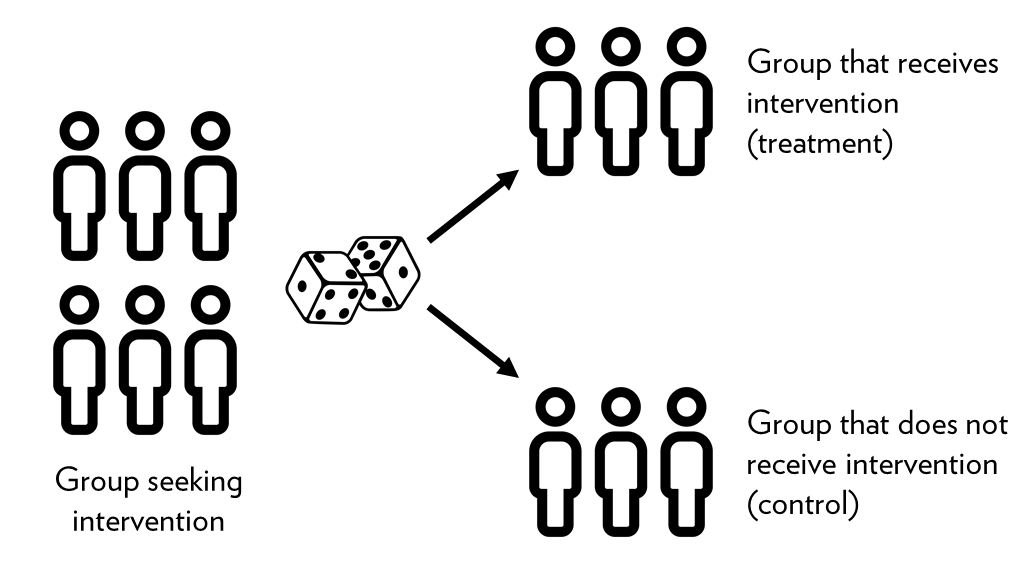
<p>One way to solve the problem of confounding factors is to employ what has become the golden standard in Economics and Social Sciences is called <strong>Randomized Control Trials (RCTs)</strong>. Data that comes from RCTs is called <strong>experimental data</strong> and is different from all data we can collect from other sources, generally called <strong>observational data</strong>. An RCT typically has a well-defined causal mechanism that directs the process of data collection to eradicate by design the problems of confounding variable. Indeed, the power of the RCTs derive from their power to isolate well the causal mechanism by virtue of a random assignment. In simple terms, the ideal RCT design starts by selecting at least two groups of similar units (individuals, firms, regions). These two groups must be similar in all characteristics such that any difference between them becomes insignificant on the averages. The comparison is then an “apples to apples” and not “apples to oranges”.</p>

<p><img src="https://noushinn.github.io/experimentation_course/fig/RCT-graphic.png" alt="" />
 <em>Source:<a href="https://noushinn.github.io/experimentation_course/defining-the-problem.html">Initiating an Experiment, Ch.4</a></em></p>

<p>The heart of the RCT is changing randomly the circumstances that surround the causal-mechanism in one of the two groups, namely, the <strong>treatment-group</strong>. The randomized assignment has two main virtues, firstly, we eradicate the problem of self-selection by controlling which of the two identical groups receives the treatment. Keep in mind that the treatment embodies the causal-mechanism that we are aiming to showcase \(X \rightarrow Y\). The second benefit is that by changing the circumstances randomly, the variable of interest is most likely disconnected or unrelated to any other \(Z\) factor affecting the outcome variable \(Y\) of our research.</p>

<p><!-- The Joshua Angrist, on of the 2021 Nobel Prize winner in his book Mastering Metrics, described the key and simple power fool advantages of RCTs. First, the RCTS --></p>

<h1 id="examples">Examples</h1>

<h2 id="chocolate-consumption-and-noble-laureates">Chocolate consumption and Noble laureates</h2>

<p>The study of <a href="https://www.sciencedirect.com/science/article/pii/S2590291120300711">Aloys LeoPrinz, (2020)</a>, studies the well known association between Nobel laureates and chocolate consumption. At first glimpse, when we look at the consumption of coffee and chocolate with the number of Nobel laureates winner, we can tell that there is a positive relationship. Using descriptive statistics, we can assess this easily with a scatter plot or correlation table.</p>

<div class="language-plaintext highlighter-rouge"><div class="highlight"><pre class="highlight"><code>library(ggplot2)
library(gridExtra)
library(dplyr)


choc_lauretes &lt;- readRDS("choc_lauretes.rds")

grid.arrange(
 
choc_lauretes %&gt;%
  ggplot(aes(cholate_per_cap, no_nobel_lau)) +
  geom_point() +
  geom_smooth(method = "lm", se = T),
 
choc_lauretes %&gt;%
  ggplot(aes(coffee_per_cap, no_nobel_lau)) +
  geom_point() +
  geom_smooth(method = "lm", se = T),
 
  nrow = 1
)


cor(choc_lauretes[, c(2L:4L)],  use="complete.obs")

</code></pre></div></div>

<table border="1">
<caption align="top"> Table: 1 </caption>
<tr> <th>  </th> <th> cholate_per_cap </th> <th> coffee_per_cap </th> <th> no_nobel_lau </th>  </tr>
  <tr> <td align="right"> cholate_per_cap </td> <td align="right"> 1.00 </td> <td align="right">  </td> <td align="right">  </td> </tr>
  <tr> <td align="right"> coffee_per_cap </td> <td align="right"> 0.45 </td> <td align="right"> 1.00 </td> <td align="right">  </td> </tr>
  <tr> <td align="right"> no_nobel_lau </td> <td align="right"> 0.17 </td> <td align="right"> -0.12 </td> <td align="right"> 1.00 </td> </tr>
   </table>

<p><br /></p>

<p>The correlation matrix shows that both chocolate and coffee have a positive association to the number of Laureates winners. The correlation of chocolate is to the Nobel winners is stronger than of the coffee. While looking at the scatter plot, we see that the trend indicates almost no relation between the coffee consumption and Nobel winners, however, we can observe a clear positive trend between chocolate consumption and Nobel Prize winners. Does chocolate consumption cause people to become smarter?</p>

<p><br /></p>

<p><img src="https://github.com/Wario84/idsc_mgs/raw/master/assets/imgs/choc_coffee.svg?raw=true" alt="" /></p>

<p>As you are probably suspecting, to show a causal link between chocolate and human cognition, a simple correlation and trend analysis are not enough. But what is missing?</p>

<ul>
  <li>Causal Mechanism</li>
</ul>

<p>In fact the sduty of <a href="https://www.sciencedirect.com/science/article/pii/S2590291120300711">Aloys LeoPrinz, (2020)</a> provides a compelling theory that claims that because of the effects of flavonoids and caffeine has a positive effect on cognition and the dopaminergic reward system of the human brain. However, his paper does not provide the nuances about how come the flavoids and caffeine interact with a particular area(s) of the brain to yield that effect. In fact, his empirical study does not provide any biological evidence supporting that claim.</p>

<ul>
  <li>Data</li>
</ul>

<p>The study uses observational data, and does not solve the problem of self-selection and confounding variables. Moreover, the unit of observation (countries) is quite disconnected from the unit of analysis (Nobel laureates winners). That is, the study attempts to describe a causal mechanism that occurs at the micro level, namely, in the brain of Nobel Prize winners. In other words, he is using a macro data at the country level to draw conclusions about the brain of researchers.</p>

<ul>
  <li>Endogeneity</li>
</ul>

<p>The study does not controls for important confounding variables such as natural ability and the level of education of individuals. Also, there is no account for motivation and the number of weekly hours that researchers invest in their work. The lack of these controls, induces doubts in the estimation because they are important determinants of research productivity. Furthermore, the data has a problem of self-selection, because individuals are choosing to consume chocolate or coffee. Henceforth, we can observe the outcome of individuals of similar characteristics that do not consume coffee or chocolate (control or counterfactual group).</p>

<h2 id="social-norms-and-energy-consumption">Social Norms and Energy Consumption.</h2>

<p>The study of <a href="https://journals.sagepub.com/doi/10.1111/j.1467-9280.2007.01917.x">Schultz, Nolan, Et. Al, (2017)</a> conducts an experiment on 290 households in San Marcos, CA, USA. The experiment was design to analyze the effect of two different kinds of social norms. One group was treated with an intervention that induce a “descriptive norm”, namely, the group was given information on their energy consumption compare to the average consumption of the neighborhood. The average consumption, has implicitly, a social norm given that individuals tend to have conformity with the behavior of their peers. The second group, was treated with another norm called the “injunctive norm” that embodies the perceptions of what is commonly right or wrong in a given situation. The core of the analysis is then to measure the effect of the two norms before and after the treatment.</p>

<ul>
  <li>Causal Mechanism</li>
</ul>

<p>The study uses the theoretical framework of “Focus theory” that predicts that if only one of the two types of norms is prominent in an individual’s consciousness, it will exert the stronger influence on behavior <a href="https://www.annualreviews.org/doi/abs/10.1146/annurev.psych.55.090902.142015?casa_token=ulIwMSo3LUQAAAAA:wRxVgEx3GoCzpwZv_2AQIWnVcLoKBs9ii-0fLxK1-8w86QqjIAarB5zkmGvyZiZXp0ISjMZkEY8F9g">(Cialdini &amp; Goldstein, 2004)</a>. The theory thus prescribe that the group treated with a “descriptive norm” will increase and decrease their energy consumption towards the mean. In contrast, the group that is treated with an “injunctive norm” should change the behavior only if they receive a negative signal (a sad face) when their consumption is above the mean, but not the other way around (boomerang effect).</p>

<ul>
  <li>Data</li>
</ul>

<p>The study uses experimental data because the treatment (social norm) is allocated randomly. The experimental data has the advantage of removing the problem of self-selection and the variable of interest \(X\), the social norm, is, by virtue of the random assignment, uncorrelated with other determinants \(Z\), of the energy consumption \(Y\).</p>

<ul>
  <li>Endogeneity</li>
</ul>

<p>The study only derives conclusions based on a difference in means, and they do not assess the effects of other factors that might drive the change of behavior, for instance, unemployment during the period of observation or absence in the household due to holidays or work. Further, it is not clear that the two groups were completely isolated from one another. The causal-mechanism depends on the prominence of one of the norms in the mind of the individuals. However, neighborhoods are typically well-know to communicate and interact among themselves, henceforth, it is not unlikely that a norm affected more than one household.</p>

<h1 id="references">References</h1>

<div id="refs" class="references csl-bib-body hanging-indent">
<div id="ref-1992Blaug10.1017/CBO9780511528224" class="csl-entry">
Blaug, Mark. 1992. <em>The Methodology of Economics: Or, How Economists
Explain</em>. 2nd ed. Cambridge Surveys of Economic Literature.
Cambridge University Press. <a href="https://doi.org/10.1017/CBO9780511528224">https://doi.org/10.1017/CBO9780511528224</a>.
</div>
<div id="ref-2017Calude10.1007/s1069901694894" class="csl-entry">
Calude, Cristian S., and Giuseppe Longo. 2017. <span>"The Deluge of
Spurious Correlations in Big Data."</span> <em>Foundations of
Science</em> 22 (3): 595-612. <a href="https://doi.org/10.1007/s10699-016-9489-4">https://doi.org/10.1007/s10699-016-9489-4</a>.
</div>
<div id="ref-2004Cialdini10.1146/annurev.psych.55.090902.142015" class="csl-entry">
Cialdini, Robert B., and Noah J. Goldstein. 2004. <span>"Social
Influence: Compliance and Conformity."</span> <em>Annual Review of
Psychology</em> 55 (1): 591-621. <a href="https://doi.org/10.1146/annurev.psych.55.090902.142015">https://doi.org/10.1146/annurev.psych.55.090902.142015</a>.
</div>
<div id="ref-2015Ductorhttps//doi.org/10.1111/obes.12070" class="csl-entry">
Ductor, Lorenzo. 2015. <span>"Does Co-Authorship Lead to Higher Academic
Productivity?"</span> <em>Oxford Bulletin of Economics and
Statistics</em> 77 (3): 385-407. https://doi.org/<a href="https://doi.org/10.1111/obes.12070">https://doi.org/10.1111/obes.12070</a>.
</div>
<div id="ref-2022GonzalezSauri10.1007/s11162022096797" class="csl-entry">
Gonzalez-Sauri, Mario, and Giulia Rossello. 2022. <span>"The Role of
Early-Career University Prestige Stratification on the Future Academic
Performance of Scholars."</span> <em>Research in Higher Education</em>,
April. <a href="https://doi.org/10.1007/s11162-022-09679-7">https://doi.org/10.1007/s11162-022-09679-7</a>.
</div>
<div id="ref-2018Maass10.17705/1jais.00526" class="csl-entry">
Maass, Wolfgang, Jeffrey Parsons, Sandeep Purao, Veda C Storey, and
Carson Woo. 2018. <span>"Data-Driven Meets Theory-Driven Research in the
Era of Big Data: Opportunities and Challenges for Information Systems
Research."</span> <em>Journal of the Association for Information
Systems</em> 19 (12): 1. <a href="https://doi.org/10.17705/1jais.00526">https://doi.org/10.17705/1jais.00526</a>.
</div>
<div id="ref-2020Nabavi" class="csl-entry">
Nabavi, Noushin. 2020. <em><span class="nocase">Chapter 4 Defining the
problem</span></em>. <a href="https://noushinn.github.io/experimentation_course/defining-the-problem.html">https://noushinn.github.io/experimentation_course/defining-the-problem.html</a>.
</div>
<div id="ref-2020Prinzhttps//doi.org/10.1016/j.ssaho.2020.100082" class="csl-entry">
Prinz, Aloys Leo. 2020. <span>"Chocolate Consumption and Noble
Laureates."</span> <em>Social Sciences &amp; Humanities Open</em>. <a href="https://doi.org/10.1016/j.ssaho.2020.100082">https://doi.org/10.1016/j.ssaho.2020.100082</a>.
</div>
<div id="ref-2007Schultz10.1111/j.14679280.2007.01917.x" class="csl-entry">
Schultz, P. Wesley, Jessica M. Nolan, Robert B. Cialdini, Noah J.
Goldstein, and Vladas Griskevicius. 2007. <span>"The Constructive,
Destructive, and Reconstructive Power of Social Norms."</span>
<em>Psychological Science</em> 18 (5): 429-34. <a href="https://doi.org/10.1111/j.1467-9280.2007.01917.x">https://doi.org/10.1111/j.1467-9280.2007.01917.x</a>.
</div>
<div id="ref-2003Stock" class="csl-entry">
Stock, James, and Mark W. Watson. 2003. <em>Introduction to
Econometrics</em>. New York: Prentice Hall; Prentice Hall.
</div>
<div id="ref-2022THE" class="csl-entry">
Times Higher Education. 2022. <span>"<span>World University
Rankings</span>."</span> <a href="https://www.timeshighereducation.com/world-university-rankings">https://www.timeshighereducation.com/world-university-rankings</a>.
</div>
</div>
<p>&lt;/div&gt;</p>]]></content><author><name>Mario H. Gonzalez-Sauri</name></author><summary type="html"><![CDATA[Introduction]]></summary></entry><entry><title type="html">Tutorial 3: Descriptive Statistics and Data Visualization.</title><link href="https://wario84.github.io/idsc_mgs/2022/03/01/w2_1_Tutorial_03.html" rel="alternate" type="text/html" title="Tutorial 3: Descriptive Statistics and Data Visualization." /><published>2022-03-01T00:00:00+00:00</published><updated>2022-03-01T00:00:00+00:00</updated><id>https://wario84.github.io/idsc_mgs/2022/03/01/w2_1_Tutorial_03</id><content type="html" xml:base="https://wario84.github.io/idsc_mgs/2022/03/01/w2_1_Tutorial_03.html"><![CDATA[<h1 id="about-the-data">About the Data</h1>

<ul>
  <li><img src="https://github.com/Wario84/idsc_mgs/raw/master/assets/data/bike_data.csv?raw=true" alt="Hourly Rental Bike Usage in Washington DC" /></li>
  <li>Data on season, day of the week, temperature, humidity, wind speed,
weather, number of users, etc.</li>
</ul>

<h1 id="exercise-1-summary-statistics">Exercise 1: summary statistics.</h1>

<p>Solve:</p>

<ol>
  <li>1.1 Average number of total users</li>
</ol>

<!-- -->

<div class="language-plaintext highlighter-rouge"><div class="highlight"><pre class="highlight"><code>[1] 189.4631
</code></pre></div></div>

<ol>
  <li>1.2 Average temperature (in F)</li>
</ol>

<!-- -->

<div class="language-plaintext highlighter-rouge"><div class="highlight"><pre class="highlight"><code>[1] 58.77751
</code></pre></div></div>

<ol>
  <li>1.3 median Humidity</li>
</ol>

<!-- -->

<div class="language-plaintext highlighter-rouge"><div class="highlight"><pre class="highlight"><code>[1] 63
</code></pre></div></div>

<ol>
  <li>1.4 Variance of the Number of Registered Users</li>
</ol>

<!-- -->

<div class="language-plaintext highlighter-rouge"><div class="highlight"><pre class="highlight"><code>[1] 22909.03
</code></pre></div></div>

<ol>
  <li>1.5 Standard Deviation of the Number of Casual Users</li>
</ol>

<!-- -->

<div class="language-plaintext highlighter-rouge"><div class="highlight"><pre class="highlight"><code>[1] 49.30503
</code></pre></div></div>

<h1 id="exercise-2-vizualization-the-data-distribution">Exercise 2: Vizualization the Data Distribution</h1>

<p>Instructions: - to include title: main - to change the color of lines:
col - to change the label of y and x axes: ylab and xlab - to change the
limit of y and x axes: ylim and xlim</p>

<p><br /></p>

<ol>
  <li>2.1 Density plot of Humidity</li>
</ol>

<p><img src="https://github.com/Wario84/idsc_mgs/raw/master/assets/imgs/unnamed-chunk-7-1.png?raw=true" alt="" /><!-- --></p>

<ol>
  <li>
    <p>2.2 Density Plot of the Temperature including the mean and the
median
<img src="https://github.com/Wario84/idsc_mgs/raw/master/assets/imgs/unnamed-chunk-8-1.png?raw=true" alt="" /><!-- --></p>
  </li>
  <li>
    <p>2.3 Histogram of Wind Speed <br />
<img src="https://github.com/Wario84/idsc_mgs/raw/master/assets/imgs/unnamed-chunk-9-1.png?raw=true" alt="" /><!-- --></p>
  </li>
  <li>
    <p>2.4 Boxplot of Casual Users Including a line with the mean
<img src="https://github.com/Wario84/idsc_mgs/raw/master/assets/imgs/unnamed-chunk-10-1.png?raw=true" alt="" /><!-- --></p>
  </li>
</ol>

<h1 id="exercise-3-normal-distribution">Exercise 3: Normal Distribution</h1>

<ol>
  <li>
    <p>3.1 Generate a normal distribution with 1000 observations, mean = 20
and sd = 3 and then plot its density plot (Use the code
set.seed(320) before)
<img src="https://github.com/Wario84/idsc_mgs/raw/master/assets/imgs/unnamed-chunk-11-1.png?raw=true" alt="" /><!-- --></p>
  </li>
  <li>
    <p>3.2 Present the Histogram of this normal distribution
<img src="https://github.com/Wario84/idsc_mgs/raw/master/assets/imgs/unnamed-chunk-12-1.png?raw=true" alt="" /><!-- --></p>
  </li>
  <li>
    <p>3.3 Present the Boxplot of this normal distribution
<img src="https://github.com/Wario84/idsc_mgs/raw/master/assets/imgs/unnamed-chunk-13-1.png?raw=true" alt="" /><!-- --></p>
  </li>
</ol>

<h1 id="excersise-4-covariance-and-correlation">Excersise 4: Covariance and Correlation</h1>

<ol>
  <li>4.1 Covariance between temperature and Total Number of Users</li>
</ol>

<!-- -->

<div class="language-plaintext highlighter-rouge"><div class="highlight"><pre class="highlight"><code>[1] 1220.347
</code></pre></div></div>

<ol>
  <li>4.2 Correlation between “Feels Like” Temperature and Total Number of
Users</li>
</ol>

<!-- -->

<div class="language-plaintext highlighter-rouge"><div class="highlight"><pre class="highlight"><code>[1] 0.4009377
</code></pre></div></div>

<ol>
  <li>4.3 Correlation Matrix of bike data</li>
</ol>

<!-- -->

<div class="language-plaintext highlighter-rouge"><div class="highlight"><pre class="highlight"><code>                          Season         Hour      Holiday Day.of.the.Week
Season               1.000000000  0.004931139  0.055947939    -0.003163450
Hour                 0.004931139  1.000000000  0.000479136    -0.003497739
Holiday              0.055947939  0.000479136  1.000000000    -0.102087791
Day.of.the.Week     -0.003163450 -0.003497739 -0.102087791     1.000000000
Working.Day         -0.036158734  0.002284998 -0.252471370     0.035955071
Weather.Type         0.040452288 -0.020202528 -0.017036113     0.003310740
Temperature.F       -0.470806327  0.137625946 -0.027356343    -0.001805613
Temperature.Feels.F -0.469271254  0.133758276 -0.030974740    -0.008817003
Humidity             0.014750149 -0.276497828 -0.010588465    -0.037158268
Wind.Speed          -0.038741686  0.137253208  0.003984692     0.011504125
Casual.Users        -0.227260165  0.301201730  0.031563628     0.032721415
Registered.Users    -0.099585576  0.374140710 -0.047345424     0.021577888
Total.Users         -0.144872483  0.394071498 -0.030927303     0.026899860
                     Working.Day Weather.Type Temperature.F Temperature.Feels.F
Season              -0.036158734   0.04045229  -0.470806327        -0.469271254
Hour                 0.002284998  -0.02020253   0.137625946         0.133758276
Holiday             -0.252471370  -0.01703611  -0.027356343        -0.030974740
Day.of.the.Week      0.035955071   0.00331074  -0.001805613        -0.008817003
Working.Day          1.000000000   0.04467222   0.055396228         0.054665178
Weather.Type         0.044672224   1.00000000  -0.102600649        -0.105570718
Temperature.F        0.055396228  -0.10260065   1.000000000         0.987677449
Temperature.Feels.F  0.054665178  -0.10557072   0.987677449         1.000000000
Humidity             0.015687512   0.41813033  -0.069889709        -0.051935510
Wind.Speed          -0.011831470   0.02622604  -0.023115427        -0.062325722
Casual.Users        -0.300942486  -0.15262788   0.459626269         0.454088895
Registered.Users     0.134325791  -0.12096552   0.335373166         0.332565807
Total.Users          0.030284368  -0.14242614   0.404785441         0.400937689
                       Humidity   Wind.Speed Casual.Users Registered.Users
Season               0.01475015 -0.038741686  -0.22726017      -0.09958558
Hour                -0.27649783  0.137253208   0.30120173       0.37414071
Holiday             -0.01058846  0.003984692   0.03156363      -0.04734542
Day.of.the.Week     -0.03715827  0.011504125   0.03272142       0.02157789
Working.Day          0.01568751 -0.011831470  -0.30094249       0.13432579
Weather.Type         0.41813033  0.026226043  -0.15262788      -0.12096552
Temperature.F       -0.06988971 -0.023115427   0.45962627       0.33537317
Temperature.Feels.F -0.05193551 -0.062325722   0.45408890       0.33256581
Humidity             1.00000000 -0.290108894  -0.34702809      -0.27393312
Wind.Speed          -0.29010889  1.000000000   0.09029235       0.08232535
Casual.Users        -0.34702809  0.090292353   1.00000000       0.50661770
Registered.Users    -0.27393312  0.082325350   0.50661770       1.00000000
Total.Users         -0.32291074  0.093239057   0.69456408       0.97215073
                    Total.Users
Season              -0.14487248
Hour                 0.39407150
Holiday             -0.03092730
Day.of.the.Week      0.02689986
Working.Day          0.03028437
Weather.Type        -0.14242614
Temperature.F        0.40478544
Temperature.Feels.F  0.40093769
Humidity            -0.32291074
Wind.Speed           0.09323906
Casual.Users         0.69456408
Registered.Users     0.97215073
Total.Users          1.00000000
</code></pre></div></div>

<h1 id="excersise-5-visualizing-two-variables">Excersise 5: Visualizing Two Variables</h1>

<ol>
  <li>
    <p>5.1 Plot Temperature in the x-axis and Total Number of Users in
y-axis
<img src="https://github.com/Wario84/idsc_mgs/raw/master/assets/imgs/unnamed-chunk-17-1.png?raw=true" alt="" /><!-- --></p>
  </li>
  <li>
    <p>5.2 Plot “Feels Like” Temperature in the x-axis and Number of Casual
Users in y-axis, Include a line that indicates the correlation
between these two variables (i.e., use the correlation as the slope
of this line)
<img src="https://github.com/Wario84/idsc_mgs/raw/master/assets/imgs/unnamed-chunk-18-1.png?raw=true?raw=true" alt="" /><!-- --></p>
  </li>
</ol>

<h2 id="exercise-6-applied-questions">Exercise 6: Applied Questions.</h2>

<ol>
  <li>6.1 Get the correlation between Temperature and “Feels Like”
Temperature and interpret its value</li>
</ol>

<!-- -->

<div class="language-plaintext highlighter-rouge"><div class="highlight"><pre class="highlight"><code>[1] 0.9876774
</code></pre></div></div>

<ol>
  <li>6.2 Density Plot of Total Users including the mean and the median.
Does this variable have a skew? If so, is it left of right skewed?
Is it possible to know this just by looking at the mean and median?
How?</li>
</ol>

<p><img src="https://github.com/Wario84/idsc_mgs/raw/master/assets/imgs/unnamed-chunk-20-1.png?raw=true?raw=true" alt="" /><!-- --></p>

<ol>
  <li>6.3 Generate a normal with 10 observations, mean = 0 and sd = 1 (use
set.seed = 99). Does this distribution looks like a normal? What
would you have to do to make it look more like a normal
distribution?</li>
</ol>

<p><img src="https://github.com/Wario84/idsc_mgs/raw/master/assets/imgs/unnamed-chunk-21-1.png?raw=true?raw=true" alt="" /><!-- --></p>

<ol>
  <li>6.4 Provide the boxplot of Registered Users, What can you infer from
this boxplot?
<img src="https://github.com/Wario84/idsc_mgs/raw/master/assets/imgs/unnamed-chunk-22-1.png?raw=true?raw=true" alt="" /><!-- --></li>
</ol>]]></content><author><name>Diogo Leitao Requena</name></author><summary type="html"><![CDATA[About the Data]]></summary></entry><entry><title type="html">Tutorial 4: Linear Regression.</title><link href="https://wario84.github.io/idsc_mgs/2022/03/01/w4_1_Tutorial_04.html" rel="alternate" type="text/html" title="Tutorial 4: Linear Regression." /><published>2022-03-01T00:00:00+00:00</published><updated>2022-03-01T00:00:00+00:00</updated><id>https://wario84.github.io/idsc_mgs/2022/03/01/w4_1_Tutorial_04</id><content type="html" xml:base="https://wario84.github.io/idsc_mgs/2022/03/01/w4_1_Tutorial_04.html"><![CDATA[<h1 id="about-the-data">About the Data</h1>

<ul>
  <li>
    <p>Panel Data from South Korea</p>
  </li>
  <li>
    <p>Variables included:</p>

    <ul>
      <li>id</li>
      <li>year</li>
      <li>wave : from wave 1st in 2005 to wave 14th in 2018</li>
      <li>region: 1) Seoul 2) Kyeong-gi 3) Kyoung-nam 4) Kyoung-buk 5)
Chung-nam 6) Gang-won &amp;. Chung-buk 7) Jeolla &amp; Jeju</li>
      <li>income: yearly income in 10,000 KRW(ten thousands Korean Won.
1100 KRW = 1 USD)</li>
      <li>family_member: no of family members</li>
      <li>gender: 1) male 2) female</li>
      <li>year_born</li>
      <li>education_level: 1) no education(under 7 yrs-old) 2) no
education(7 &amp; over 7 yrs-old) 3) elementary 4) middle school 5)
high school 6) college 7) university degree 8) MA 9) doctoral
degree</li>
      <li>marriage: marital status. 1) not applicable (under 18) 2)
married 3) separated by death 4) separated 5) not married yet 6)
others</li>
      <li>religion: 1) have religion 2) do not have</li>
      <li>occupation</li>
      <li>company_size</li>
      <li>reason_none_worker: 1) no capable 2) in military service 3)
studying in school 4) prepare for school 5) prepare to apply
job 6) house worker 7) caring kids at home 8) nursing 9)
giving-up economic activities 10) no intention to work 11)
others</li>
    </ul>
  </li>
</ul>

<h1 id="exercise-1-linear-regression">Exercise 1: Linear Regression</h1>

<p>a 1.1 Regress education level on income.</p>

<div class="language-plaintext highlighter-rouge"><div class="highlight"><pre class="highlight"><code>Call:
lm(formula = income ~ education_level, data = korea)

Residuals:
    Min      1Q  Median      3Q     Max 
-237119   -1461    -439     790  462253 

Coefficients:
                 Estimate Std. Error t value Pr(&gt;|t|)    
(Intercept)     -1118.833     36.118  -30.98   &lt;2e-16 ***
education_level  1010.652      7.507  134.62   &lt;2e-16 ***
---
Signif. codes:  0 '***' 0.001 '**' 0.01 '*' 0.05 '.' 0.1 ' ' 1

Residual standard error: 3820 on 92855 degrees of freedom
Multiple R-squared:  0.1633,    Adjusted R-squared:  0.1633 
F-statistic: 1.812e+04 on 1 and 92855 DF,  p-value: &lt; 2.2e-16
</code></pre></div></div>

<p>b 1.2 Create an age variable and regress it on income</p>

<div class="language-plaintext highlighter-rouge"><div class="highlight"><pre class="highlight"><code>Call:
lm(formula = income ~ age, data = korea)

Residuals:
    Min      1Q  Median      3Q     Max 
-236901   -1633    -697     800  465548 

Coefficients:
             Estimate Std. Error t value Pr(&gt;|t|)    
(Intercept) 8278.5654    48.6856   170.0   &lt;2e-16 ***
age          -82.6049     0.8013  -103.1   &lt;2e-16 ***
---
Signif. codes:  0 '***' 0.001 '**' 0.01 '*' 0.05 '.' 0.1 ' ' 1

Residual standard error: 3956 on 92855 degrees of freedom
Multiple R-squared:  0.1027,    Adjusted R-squared:  0.1027 
F-statistic: 1.063e+04 on 1 and 92855 DF,  p-value: &lt; 2.2e-16
</code></pre></div></div>

<p>c 1.3 Regress both age and education level on income</p>

<div class="language-plaintext highlighter-rouge"><div class="highlight"><pre class="highlight"><code>Call:
lm(formula = income ~ age + education_level, data = korea)

Residuals:
    Min      1Q  Median      3Q     Max 
-237303   -1463    -431     731  462951 

Coefficients:
                 Estimate Std. Error t value Pr(&gt;|t|)    
(Intercept)     1321.5122    92.4989   14.29   &lt;2e-16 ***
age              -28.3540     0.9902  -28.64   &lt;2e-16 ***
education_level  837.7978     9.6077   87.20   &lt;2e-16 ***
---
Signif. codes:  0 '***' 0.001 '**' 0.01 '*' 0.05 '.' 0.1 ' ' 1

Residual standard error: 3803 on 92854 degrees of freedom
Multiple R-squared:  0.1706,    Adjusted R-squared:  0.1706 
F-statistic:  9551 on 2 and 92854 DF,  p-value: &lt; 2.2e-16
</code></pre></div></div>

<p>d 1.4 Regress log of age and education level on income</p>

<div class="language-plaintext highlighter-rouge"><div class="highlight"><pre class="highlight"><code>Call:
lm(formula = income ~ log_age + education_level, data = korea)

Residuals:
    Min      1Q  Median      3Q     Max 
-237212   -1459    -440     752  462701 

Coefficients:
                Estimate Std. Error t value Pr(&gt;|t|)    
(Intercept)      3180.67     240.01   13.25   &lt;2e-16 ***
log_age          -948.16      52.33  -18.12   &lt;2e-16 ***
education_level   903.97       9.53   94.85   &lt;2e-16 ***
---
Signif. codes:  0 '***' 0.001 '**' 0.01 '*' 0.05 '.' 0.1 ' ' 1

Residual standard error: 3813 on 92854 degrees of freedom
Multiple R-squared:  0.1662,    Adjusted R-squared:  0.1662 
F-statistic:  9257 on 2 and 92854 DF,  p-value: &lt; 2.2e-16
</code></pre></div></div>

<ol>
  <li>1.5 Regress gender, log of age and education level on income.
Present only the coefficients</li>
</ol>

<p>tip: explore the lm function on the help tab</p>

<div class="language-plaintext highlighter-rouge"><div class="highlight"><pre class="highlight"><code>    (Intercept)         log_age education_level          gender 
      5307.3048       -934.4571        766.9034      -1206.0092 
</code></pre></div></div>

<h1 id="exercise-2-t-test">Exercise 2: T-test</h1>

<ol>
  <li>2.1 Get the average number of family members for each one of
groups: 1) have religion, 2) do not have a religion, 9) unknown.</li>
</ol>

<!-- -->

<div class="language-plaintext highlighter-rouge"><div class="highlight"><pre class="highlight"><code>       1        2        9 
2.409554 2.559758 3.129630 
</code></pre></div></div>

<ol>
  <li>2.2 perform a t-test to know if the means are statistically
significant different from each other</li>
</ol>

<p>tip: you will have to remove the observations where religion = 9 before</p>

<div class="language-plaintext highlighter-rouge"><div class="highlight"><pre class="highlight"><code>    Welch Two Sample t-test

data:  family_member by religion
t = -17.737, df = 92793, p-value &lt; 2.2e-16
alternative hypothesis: true difference in means between group 1 and group 2 is not equal to 0
95 percent confidence interval:
 -0.1668026 -0.1336061
sample estimates:
mean in group 1 mean in group 2 
       2.409554        2.559758 
</code></pre></div></div>

<h1 id="exercise-3-visualization-a-regression">Exercise 3: Visualization a Regression</h1>

<ol>
  <li>3.1 Using ggplot, visualize the regression done in 1.1</li>
</ol>

<!-- -->

<div class="language-plaintext highlighter-rouge"><div class="highlight"><pre class="highlight"><code>`geom_smooth()` using formula 'y ~ x'
</code></pre></div></div>

<p><img src="https://github.com/Wario84/idsc_mgs/raw/master/assets/imgs/tutorial04/UNNAME_4.PNG?raw=true" alt="" /><!-- --></p>

<ol>
  <li>3.2 Visualize the regression done in 1.2.</li>
</ol>

<!-- -->

<div class="language-plaintext highlighter-rouge"><div class="highlight"><pre class="highlight"><code>`geom_smooth()` using formula 'y ~ x'
</code></pre></div></div>

<p><img src="https://github.com/Wario84/idsc_mgs/raw/master/assets/imgs/tutorial04/UNNAME_1.PNG?raw=true" alt="" /><!-- --></p>

<p>PS: Even though the correlation is significant it is not that clear when
looking at the graphs (Too many outliers)</p>

<ol>
  <li>3.3 repeat 3.2, but only show observations with an income up to
20,000</li>
</ol>

<!-- -->

<div class="language-plaintext highlighter-rouge"><div class="highlight"><pre class="highlight"><code>`geom_smooth()` using formula 'y ~ x'

Warning: Removed 505 rows containing non-finite values (stat_smooth).

Warning: Removed 505 rows containing missing values (geom_point).
</code></pre></div></div>

<p><img src="https://github.com/Wario84/idsc_mgs/raw/master/assets/imgs/tutorial04/UNNAME_2.PNG?raw=true" alt="" /><!-- --></p>

<h1 id="exercise-4">Exercise 4</h1>

<ul>
  <li>We will use another dataset in this exercise: Data on house prices
in london</li>
</ul>

<ol>
  <li>4.1 Regress area (in sq feet) on the price. Interpret the
coefficients (i.e., the value and their statistical significance)</li>
</ol>

<!-- -->

<div class="language-plaintext highlighter-rouge"><div class="highlight"><pre class="highlight"><code>Call:
lm(formula = Price ~ Area.in.sq.ft, data = london_house)

Residuals:
     Min       1Q   Median       3Q      Max 
-8755213  -503561  -167061   129088 33546963 

Coefficients:
               Estimate Std. Error t value Pr(&gt;|t|)    
(Intercept)   -36674.05   45936.19  -0.798    0.425    
Area.in.sq.ft   1109.68      20.98  52.897   &lt;2e-16 ***
---
Signif. codes:  0 '***' 0.001 '**' 0.01 '*' 0.05 '.' 0.1 ' ' 1

Residual standard error: 1688000 on 3478 degrees of freedom
Multiple R-squared:  0.4458,    Adjusted R-squared:  0.4457 
F-statistic:  2798 on 1 and 3478 DF,  p-value: &lt; 2.2e-16
</code></pre></div></div>

<ol>
  <li>4.2 Regress the log of area (in sq feet) on the price. Interpret the
coefficients.</li>
</ol>

<!-- -->

<div class="language-plaintext highlighter-rouge"><div class="highlight"><pre class="highlight"><code>Call:
lm(formula = Price ~ log_area, data = london_house)

Residuals:
     Min       1Q   Median       3Q      Max 
-3447406  -834395  -205682   438856 34869633 

Coefficients:
             Estimate Std. Error t value Pr(&gt;|t|)    
(Intercept) -13584801     344947  -39.38   &lt;2e-16 ***
log_area      2138504      47561   44.96   &lt;2e-16 ***
---
Signif. codes:  0 '***' 0.001 '**' 0.01 '*' 0.05 '.' 0.1 ' ' 1

Residual standard error: 1803000 on 3478 degrees of freedom
Multiple R-squared:  0.3676,    Adjusted R-squared:  0.3674 
F-statistic:  2022 on 1 and 3478 DF,  p-value: &lt; 2.2e-16
</code></pre></div></div>

<ol>
  <li>4.3 Display the regression fit done in 4.1 graphically. Looking at
the plot, do you think the area is enough to predict the value of a
house</li>
</ol>

<!-- -->

<div class="language-plaintext highlighter-rouge"><div class="highlight"><pre class="highlight"><code>`geom_smooth()` using formula 'y ~ x'
</code></pre></div></div>

<p>!<img src="https://github.com/Wario84/idsc_mgs/raw/master/assets/imgs/tutorial04/UNNAME_3.PNG?raw=true" alt="" /><!-- --></p>

<ol>
  <li>4.4 Regress the log of area on the price again, but now control for
the city county and number of bedrooms. Why would we want to control
for different counties? Does the coefficient of N of Bedrooms has
the expected sign?</li>
</ol>

<!-- -->

<div class="language-plaintext highlighter-rouge"><div class="highlight"><pre class="highlight"><code>Call:
lm(formula = Price ~ log_area + City.County + No..of.Bedrooms, 
    data = london_house)

Residuals:
     Min       1Q   Median       3Q      Max 
-3539955  -784231  -191495   446677 33697553 

Coefficients:
                                     Estimate Std. Error t value Pr(&gt;|t|)    
(Intercept)                         -23734985    1789948 -13.260   &lt;2e-16 ***
log_area                              3673635      95113  38.624   &lt;2e-16 ***
City.County27 Carlton Drive           1838298    2384893   0.771    0.441    
City.County311 Goldhawk Road           251035    2384362   0.105    0.916    
City.County4 Circus Road West          637541    2384422   0.267    0.789    
City.County52 Holloway Road           1594405    2384641   0.669    0.504    
City.County6 Deal Street               600116    2384423   0.252    0.801    
City.County82-88 Fulham High Street   1353683    2384563   0.568    0.570    
City.CountyBattersea                   833206    2065216   0.403    0.687    
City.CountyBlackheath                  672067    2384912   0.282    0.778    
City.CountyBushey                    -1137737    2384441  -0.477    0.633    
City.CountyChelsea                    1106813    1946854   0.569    0.570    
City.CountyChessington                 130712    2384396   0.055    0.956    
City.CountyCity Of London             1492139    2064974   0.723    0.470    
City.CountyClapton                    1539011    2384625   0.645    0.519    
City.CountyClerkenwell                1616168    2384598   0.678    0.498    
City.CountyDe Beauvoir                 209057    2384847   0.088    0.930    
City.CountyDeptford                   1293718    2384780   0.542    0.588    
City.CountyDowns Road                 -191611    2384341  -0.080    0.936    
City.CountyE5 8DE                     -204646    2064925  -0.099    0.921    
City.CountyEaling                     -211849    2384840  -0.089    0.929    
City.CountyEssex                      -250797    1700106  -0.148    0.883    
City.CountyFitzrovia                  1869415    2384676   0.784    0.433    
City.CountyFulham                      592614    1847062   0.321    0.748    
City.CountyFulham High Street         1732175    2384854   0.726    0.468    
City.CountyGreenford                  1032605    2385692   0.433    0.665    
City.CountyHertfordshire              -478510    1777923  -0.269    0.788    
City.CountyHolland Park               1217343    2384485   0.511    0.610    
City.CountyHornchurch                  454640    2386091   0.191    0.849    
City.CountyKensington                 2114679    2384628   0.887    0.375    
City.CountyKent                      -2186168    2385234  -0.917    0.359    
City.CountyLambourne End              -992796    2385091  -0.416    0.677    
City.CountyLillie Square              2322928    2384467   0.974    0.330    
City.CountyLittle Venice              1233507    2384533   0.517    0.605    
City.CountyLondon                     1194884    1686516   0.708    0.479    
City.CountyLondon1500                   46965    2384463   0.020    0.984    
City.CountyMarylebone                 2366145    1885108   1.255    0.210    
City.CountyMiddlesex                  -215738    1697289  -0.127    0.899    
City.CountyMiddx                     -1404958    2385323  -0.589    0.556    
City.CountyN1 6FU                     1722555    2385430   0.722    0.470    
City.CountyN7 6QX                      998057    1802625   0.554    0.580    
City.CountyNorthwood                   231127    2065368   0.112    0.911    
City.CountyOxshott                   -1871493    2386503  -0.784    0.433    
City.CountyQueens Park                 648622    2384413   0.272    0.786    
City.CountyRichmond                   -201387    2065328  -0.098    0.922    
City.CountyRichmond Hill               397874    2384575   0.167    0.867    
City.CountyRomford                   -1079758    2385756  -0.453    0.651    
City.CountySpitalfields               -982532    2384692  -0.412    0.680    
City.CountySurrey                     -307927    1689877  -0.182    0.855    
City.CountySurrey Quays               1698776    2384685   0.712    0.476    
City.CountyThames Ditton              -353279    2384799  -0.148    0.882    
City.CountyThe Metal Works             748814    2384386   0.314    0.754    
City.CountyThurleigh Road              208120    1803097   0.115    0.908    
City.CountyTwickenham                  191162    1755395   0.109    0.913    
City.CountyWandsworth                   34922    2065234   0.017    0.987    
City.CountyWatford                    -759393    1886148  -0.403    0.687    
City.CountyWimbledon                  -419106    2384650  -0.176    0.860    
City.CountyWornington Road            1240295    1847103   0.671    0.502    
No..of.Bedrooms                       -625580      40088 -15.605   &lt;2e-16 ***
---
Signif. codes:  0 '***' 0.001 '**' 0.01 '*' 0.05 '.' 0.1 ' ' 1

Residual standard error: 1686000 on 3421 degrees of freedom
Multiple R-squared:  0.4563,    Adjusted R-squared:  0.447 
F-statistic: 49.49 on 58 and 3421 DF,  p-value: &lt; 2.2e-16
</code></pre></div></div>

<ol>
  <li>4.5 Regress the square of area and area on the price. Do you think
the relationship between the area and the price is linear or
non-linear?</li>
</ol>

<!-- -->

<div class="language-plaintext highlighter-rouge"><div class="highlight"><pre class="highlight"><code>Call:
lm(formula = Price ~ area2 + Area.in.sq.ft, data = london_house)

Residuals:
     Min       1Q   Median       3Q      Max 
-8162658  -516343  -143281   160531 33506243 

Coefficients:
                Estimate Std. Error t value Pr(&gt;|t|)    
(Intercept)   -1.440e+05  6.306e+04  -2.283   0.0225 *  
area2         -1.286e-02  5.182e-03  -2.481   0.0131 *  
Area.in.sq.ft  1.208e+03  4.494e+01  26.888   &lt;2e-16 ***
---
Signif. codes:  0 '***' 0.001 '**' 0.01 '*' 0.05 '.' 0.1 ' ' 1

Residual standard error: 1687000 on 3477 degrees of freedom
Multiple R-squared:  0.4468,    Adjusted R-squared:  0.4465 
F-statistic:  1404 on 2 and 3477 DF,  p-value: &lt; 2.2e-16
</code></pre></div></div>

<h1 id="exercise-5">Exercise 5</h1>

<ol>
  <li>5.1 Create a dummy variable that is equal to 1 if the number of
bathrooms is greater than 2 and 0 otherwise. Regress this dummy on
the price. Interpret the results</li>
</ol>

<!-- -->

<div class="language-plaintext highlighter-rouge"><div class="highlight"><pre class="highlight"><code>Call:
lm(formula = Price ~ d_bathroom, data = london_house)

Residuals:
     Min       1Q   Median       3Q      Max 
-2168411  -943411  -344676   130324 37206589 

Coefficients:
            Estimate Std. Error t value Pr(&gt;|t|)    
(Intercept)   969676      54943   17.65   &lt;2e-16 ***
d_bathroom   1573735      72877   21.59   &lt;2e-16 ***
---
Signif. codes:  0 '***' 0.001 '**' 0.01 '*' 0.05 '.' 0.1 ' ' 1

Residual standard error: 2129000 on 3478 degrees of freedom
Multiple R-squared:  0.1182,    Adjusted R-squared:  0.118 
F-statistic: 466.3 on 1 and 3478 DF,  p-value: &lt; 2.2e-16
</code></pre></div></div>

<ol>
  <li>5.2 Perform the same regression done in 5.1, but now include the
area as an additional independent variable. What happens with the
coefficient of the dummy? Interpret it. Why do you think this
happens?</li>
</ol>

<!-- -->

<div class="language-plaintext highlighter-rouge"><div class="highlight"><pre class="highlight"><code>Call:
lm(formula = Price ~ d_bathroom + Area.in.sq.ft, data = london_house)

Residuals:
     Min       1Q   Median       3Q      Max 
-9001985  -477709  -189080   107772 33486687 

Coefficients:
                Estimate Std. Error t value Pr(&gt;|t|)    
(Intercept)      1445.92   48460.12   0.030   0.9762    
d_bathroom    -170118.65   69321.99  -2.454   0.0142 *  
Area.in.sq.ft    1143.87      25.17  45.443   &lt;2e-16 ***
---
Signif. codes:  0 '***' 0.001 '**' 0.01 '*' 0.05 '.' 0.1 ' ' 1

Residual standard error: 1687000 on 3477 degrees of freedom
Multiple R-squared:  0.4468,    Adjusted R-squared:  0.4465 
F-statistic:  1404 on 2 and 3477 DF,  p-value: &lt; 2.2e-16
</code></pre></div></div>

<ol>
  <li>5.3 What is Omitted Variable Bias? Can you give examples of two
additional variables that are not in the data that could influence
the price of a house?</li>
</ol>]]></content><author><name>Diogo Leitao Requena</name></author><summary type="html"><![CDATA[About the Data]]></summary></entry><entry><title type="html">Tutorial 5: Algorithms.</title><link href="https://wario84.github.io/idsc_mgs/2022/03/01/w5_1_Tutorial_05.html" rel="alternate" type="text/html" title="Tutorial 5: Algorithms." /><published>2022-03-01T00:00:00+00:00</published><updated>2022-03-01T00:00:00+00:00</updated><id>https://wario84.github.io/idsc_mgs/2022/03/01/w5_1_Tutorial_05</id><content type="html" xml:base="https://wario84.github.io/idsc_mgs/2022/03/01/w5_1_Tutorial_05.html"><![CDATA[<h1 id="about-the-data">About the Data</h1>

<h1 id="exercise-1-loops">Exercise 1: Loops</h1>

<p>a 1.1 Create a loop that iterates over the number 1 to 12 and print the
square of each value</p>

<div class="language-plaintext highlighter-rouge"><div class="highlight"><pre class="highlight"><code>[1] 1
[1] 4
[1] 9
[1] 16
[1] 25
[1] 36
[1] 49
[1] 64
[1] 81
[1] 100
[1] 121
[1] 144
</code></pre></div></div>

<ol>
  <li>1.2 Create a loop that iterates over the numbers 1 to 100 and only
prints even numbers</li>
</ol>

<!-- -->

<div class="language-plaintext highlighter-rouge"><div class="highlight"><pre class="highlight"><code>[1] 2
[1] 4
[1] 6
[1] 8
[1] 10
[1] 12
[1] 14
[1] 16
[1] 18
[1] 20
[1] 22
[1] 24
[1] 26
[1] 28
[1] 30
[1] 32
[1] 34
[1] 36
[1] 38
[1] 40
[1] 42
[1] 44
[1] 46
[1] 48
[1] 50
[1] 52
[1] 54
[1] 56
[1] 58
[1] 60
[1] 62
[1] 64
[1] 66
[1] 68
[1] 70
[1] 72
[1] 74
[1] 76
[1] 78
[1] 80
[1] 82
[1] 84
[1] 86
[1] 88
[1] 90
[1] 92
[1] 94
[1] 96
[1] 98
[1] 100
</code></pre></div></div>

<ol>
  <li>1.3 Create a loop that adds 1/2 to each element of a vector where
the first element is 2. Stop when the loop reaches 20</li>
</ol>

<!-- -->

<div class="language-plaintext highlighter-rouge"><div class="highlight"><pre class="highlight"><code> [1]  2.0  2.5  3.0  3.5  4.0  4.5  5.0  5.5  6.0  6.5  7.0  7.5  8.0  8.5  9.0
[16]  9.5 10.0 10.5 11.0 11.5 12.0 12.5 13.0 13.5 14.0 14.5 15.0 15.5 16.0 16.5
[31] 17.0 17.5 18.0 18.5 19.0 19.5 20.0
</code></pre></div></div>

<ol>
  <li>Create a while loop that starts with the value of 0.5 and add one
fourth of the last value on each iteration Repeat this loop while
the value is less than 40.</li>
</ol>

<!-- -->

<div class="language-plaintext highlighter-rouge"><div class="highlight"><pre class="highlight"><code>[1] 0.5
[1] 0.625
[1] 0.78125
[1] 0.9765625
[1] 1.220703
[1] 1.525879
[1] 1.907349
[1] 2.384186
[1] 2.980232
[1] 3.72529
[1] 4.656613
[1] 5.820766
[1] 7.275958
[1] 9.094947
[1] 11.36868
[1] 14.21085
[1] 17.76357
[1] 22.20446
[1] 27.75558
[1] 34.69447
</code></pre></div></div>

<h2 id="exercise-2-applying-loops-to-a-dataset">Exercise 2: Applying Loops to a Dataset</h2>

<ul>
  <li>In this exercise, we will use the College dataset</li>
  <li>All questions need to be answered using loops</li>
</ul>

<ol>
  <li>2.1 Use a Loop to compute the variance of every column in
College.csv, print the results in a vector. If the variable is not
numeric (or integer) print the string “no variance”.</li>
</ol>

<!-- -->

<div class="language-plaintext highlighter-rouge"><div class="highlight"><pre class="highlight"><code> [1] "no variance"      "no variance"      "14978459.5301251" "6007959.69879526"
 [5] "863368.392309836" "311.182455651528" "392.229215592618" "23526579.3264538"
 [9] "2317798.85145418" "16184661.6314367" "1202743.02797569" "27259.779945999" 
[13] "458425.753267258" "266.608635513275" "216.747840624129" "15.6685278761825"
[17] "153.556744152105" "27266865.6394771" "295.073717310831" "no variance"     
[21] "no variance"     
</code></pre></div></div>

<ol>
  <li>2.2 Compute the number of unique values in each column of
College.csv</li>
</ol>

<!-- -->

<div class="language-plaintext highlighter-rouge"><div class="highlight"><pre class="highlight"><code> [1] 777   2 711 693 581  82  89 714 566 640 553 122 294  78  65 173  61 744  81
[20]   2   2
</code></pre></div></div>

<ol>
  <li>2.3 Generate (using a loop) 20 random normally distributed vectors
(of length 100 each) with mean 100 and sd 10</li>
</ol>

<p>Save the mean minus the median of each randomly generated vector inside
a new vector (Use set.seed(28))</p>

<div class="language-plaintext highlighter-rouge"><div class="highlight"><pre class="highlight"><code> [1]  1.75261330  1.80825286 -1.29377663  1.22513780 -1.04835404  0.07878913
 [7] -1.82175663 -0.60195083 -1.19990087 -1.19068782  2.04934384 -1.34000940
[13] -1.65250370  0.55954496 -1.16188787 -0.84151065  1.07363336 -2.32332294
[19]  1.11157950  0.04375424
</code></pre></div></div>

<ol>
  <li>2.4 Using a for loop, create an algorithm that returns the lowest
outlier for each numeric (or integer) variable. If the variable does
not have an outlier, it should return the string “No outliers”. If
the variable is not numeric (or integer), print the string not
numeric/integer</li>
</ol>

<!-- -->

<div class="language-plaintext highlighter-rouge"><div class="highlight"><pre class="highlight"><code> [1] "not numeric/integer" "not numeric/integer" "8000"               
 [4] "5200"                "1902"                "66"                 
 [7] "No outliers"         "8528"                "2281"               
[10] "21700"               "7262"                "96"                 
[13] "3000"                "8"                   "24"                 
[16] "2.5"                 "60"                  "17007"              
[19] "10"                  "not numeric/integer" "not numeric/integer"
</code></pre></div></div>

<h2 id="exercise-3-generate-the-following-series-using-loops-print-100-iterations-of-each">Exercise 3. Generate the Following Series (using loops), print 100 iterations of each:</h2>

<ol>
  <li>3.1 Harmonic Series: \(\frac{1}{1} + \frac{1}{2} + \frac{1}{3} + ... \rightarrow \infty\)</li>
</ol>

<!-- -->

<div class="language-plaintext highlighter-rouge"><div class="highlight"><pre class="highlight"><code>  [1] 0.000000 1.000000 1.500000 1.833333 2.083333 2.283333 2.450000 2.592857
  [9] 2.717857 2.828968 2.928968 3.019877 3.103211 3.180134 3.251562 3.318229
 [17] 3.380729 3.439553 3.495108 3.547740 3.597740 3.645359 3.690813 3.734292
 [25] 3.775958 3.815958 3.854420 3.891457 3.927171 3.961654 3.994987 4.027245
 [33] 4.058495 4.088798 4.118210 4.146781 4.174559 4.201586 4.227902 4.253543
 [41] 4.278543 4.302933 4.326743 4.349999 4.372726 4.394948 4.416687 4.437964
 [49] 4.458797 4.479205 4.499205 4.518813 4.538044 4.556912 4.575430 4.593612
 [57] 4.611469 4.629013 4.646255 4.663204 4.679870 4.696264 4.712393 4.728266
 [65] 4.743891 4.759276 4.774427 4.789352 4.804058 4.818551 4.832837 4.846921
 [73] 4.860810 4.874509 4.888022 4.901356 4.914514 4.927501 4.940321 4.952979
 [81] 4.965479 4.977825 4.990020 5.002068 5.013973 5.025738 5.037366 5.048860
 [89] 5.060224 5.071459 5.082571 5.093560 5.104429 5.115182 5.125820 5.136346
 [97] 5.146763 5.157072 5.167277 5.177378 5.187378
</code></pre></div></div>

<ol>
  <li>3.2 Sum of Reciprocals of Square Numbers: \(\frac{1}{1} + \frac{1}{4} + \frac{1}{9} + ... = \frac{\pi}{6}\)</li>
</ol>

<!-- -->

<div class="language-plaintext highlighter-rouge"><div class="highlight"><pre class="highlight"><code>  [1] 0.000000 1.000000 1.250000 1.361111 1.423611 1.463611 1.491389 1.511797
  [9] 1.527422 1.539768 1.549768 1.558032 1.564977 1.570894 1.575996 1.580440
 [17] 1.584347 1.587807 1.590893 1.593663 1.596163 1.598431 1.600497 1.602387
 [25] 1.604123 1.605723 1.607203 1.608574 1.609850 1.611039 1.612150 1.613191
 [33] 1.614167 1.615086 1.615951 1.616767 1.617539 1.618269 1.618962 1.619619
 [41] 1.620244 1.620839 1.621406 1.621947 1.622463 1.622957 1.623430 1.623882
 [49] 1.624316 1.624733 1.625133 1.625517 1.625887 1.626243 1.626586 1.626917
 [57] 1.627235 1.627543 1.627840 1.628128 1.628406 1.628674 1.628934 1.629186
 [65] 1.629431 1.629667 1.629897 1.630120 1.630336 1.630546 1.630750 1.630948
 [73] 1.631141 1.631329 1.631511 1.631689 1.631862 1.632031 1.632195 1.632356
 [81] 1.632512 1.632664 1.632813 1.632958 1.633100 1.633238 1.633374 1.633506
 [89] 1.633635 1.633761 1.633884 1.634005 1.634123 1.634239 1.634352 1.634463
 [97] 1.634571 1.634678 1.634782 1.634884 1.634984
</code></pre></div></div>

<ol>
  <li>3.3 Sum of Reciprocals of the power of any \(n &gt; 1\):
\(\frac{1}{1} + \frac{1}{n} + \frac{1}{n^2} + \frac{1}{n^3} + ... = \frac{n}{n-1}\)</li>
</ol>

<p>Do it once for n = 2 and another for n = 10</p>

<div class="language-plaintext highlighter-rouge"><div class="highlight"><pre class="highlight"><code>  [1] 1.000000 1.500000 1.750000 1.875000 1.937500 1.968750 1.984375 1.992188
  [9] 1.996094 1.998047 1.999023 1.999512 1.999756 1.999878 1.999939 1.999969
 [17] 1.999985 1.999992 1.999996 1.999998 1.999999 2.000000 2.000000 2.000000
 [25] 2.000000 2.000000 2.000000 2.000000 2.000000 2.000000 2.000000 2.000000
 [33] 2.000000 2.000000 2.000000 2.000000 2.000000 2.000000 2.000000 2.000000
 [41] 2.000000 2.000000 2.000000 2.000000 2.000000 2.000000 2.000000 2.000000
 [49] 2.000000 2.000000 2.000000 2.000000 2.000000 2.000000 2.000000 2.000000
 [57] 2.000000 2.000000 2.000000 2.000000 2.000000 2.000000 2.000000 2.000000
 [65] 2.000000 2.000000 2.000000 2.000000 2.000000 2.000000 2.000000 2.000000
 [73] 2.000000 2.000000 2.000000 2.000000 2.000000 2.000000 2.000000 2.000000
 [81] 2.000000 2.000000 2.000000 2.000000 2.000000 2.000000 2.000000 2.000000
 [89] 2.000000 2.000000 2.000000 2.000000 2.000000 2.000000 2.000000 2.000000
 [97] 2.000000 2.000000 2.000000 2.000000 2.000000

  [1] 1.000000 1.100000 1.110000 1.111000 1.111100 1.111110 1.111111 1.111111
  [9] 1.111111 1.111111 1.111111 1.111111 1.111111 1.111111 1.111111 1.111111
 [17] 1.111111 1.111111 1.111111 1.111111 1.111111 1.111111 1.111111 1.111111
 [25] 1.111111 1.111111 1.111111 1.111111 1.111111 1.111111 1.111111 1.111111
 [33] 1.111111 1.111111 1.111111 1.111111 1.111111 1.111111 1.111111 1.111111
 [41] 1.111111 1.111111 1.111111 1.111111 1.111111 1.111111 1.111111 1.111111
 [49] 1.111111 1.111111 1.111111 1.111111 1.111111 1.111111 1.111111 1.111111
 [57] 1.111111 1.111111 1.111111 1.111111 1.111111 1.111111 1.111111 1.111111
 [65] 1.111111 1.111111 1.111111 1.111111 1.111111 1.111111 1.111111 1.111111
 [73] 1.111111 1.111111 1.111111 1.111111 1.111111 1.111111 1.111111 1.111111
 [81] 1.111111 1.111111 1.111111 1.111111 1.111111 1.111111 1.111111 1.111111
 [89] 1.111111 1.111111 1.111111 1.111111 1.111111 1.111111 1.111111 1.111111
 [97] 1.111111 1.111111 1.111111 1.111111 1.111111
</code></pre></div></div>

<ol>
  <li>3.4 Grandi’s Series:
\(1 - 1 + 1 - 1 + 1 - ... = \sum_{n=0}^{\infty}(-1)^n\)</li>
</ol>

<!-- -->

<div class="language-plaintext highlighter-rouge"><div class="highlight"><pre class="highlight"><code>  [1] 1 0 1 0 1 0 1 0 1 0 1 0 1 0 1 0 1 0 1 0 1 0 1 0 1 0 1 0 1 0 1 0 1 0 1 0 1
 [38] 0 1 0 1 0 1 0 1 0 1 0 1 0 1 0 1 0 1 0 1 0 1 0 1 0 1 0 1 0 1 0 1 0 1 0 1 0
 [75] 1 0 1 0 1 0 1 0 1 0 1 0 1 0 1 0 1 0 1 0 1 0 1 0 1 0 1
</code></pre></div></div>

<h2 id="exercise-4-theorethical-questions">Exercise 4. Theorethical Questions</h2>

<ol>
  <li>
    <p>In which recursion problems is best to use a <code class="language-plaintext highlighter-rouge">while</code> rather than a
<code class="language-plaintext highlighter-rouge">for</code> loop.</p>
  </li>
  <li>
    <p>Define what is an algorithm? and what makes it different from a
mathematical operation?</p>
  </li>
  <li>
    <p>In which cases is worth to invest time in building your own
algorithms.</p>
  </li>
</ol>]]></content><author><name>Diogo Leitao Requena &amp; Mario H. Gonzalez-Sauri</name></author><summary type="html"><![CDATA[About the Data]]></summary></entry></feed>